Quick answer
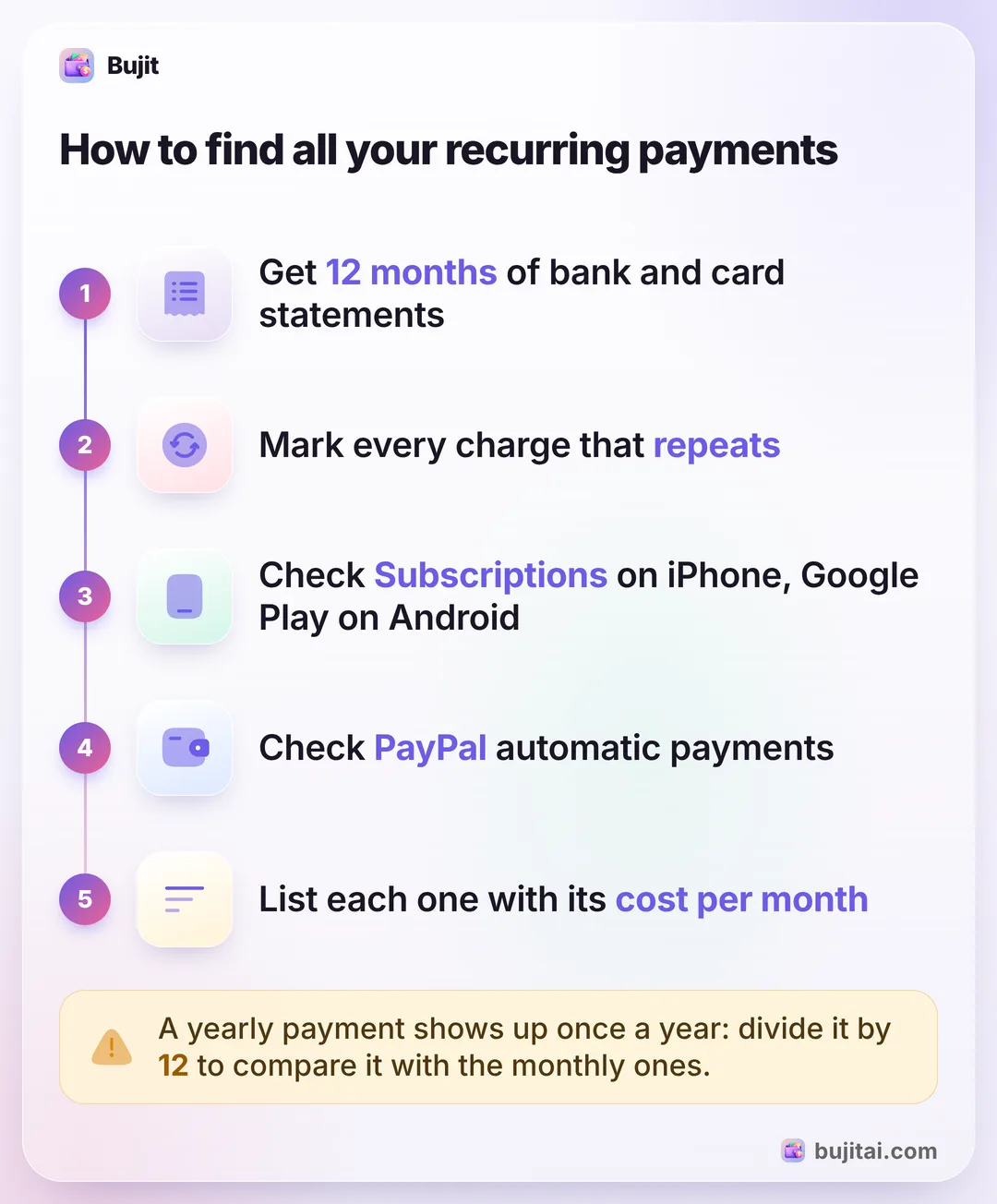
Recurring payments are charges that repeat on a schedule, such as rent, phone bills, insurance and subscriptions. To find yours, go through 12 months of bank and card statements and mark every charge that repeats, then check what Apple, Google Play and PayPal bill you for. List each with its amount and date, and total what they cost a month.
- Where to look
- 12 months of bank and card statements
- On iPhone
- Settings, your name, Subscriptions
- On Android
- Google Account, Wallet & subscriptions
- To stop one
- Cancel with the company first
On this page
What counts as a recurring payment
Recurring payments are charges you agree to once that then repeat on a schedule without you doing anything. They come in a few kinds, and each kind hides in a different place:
- Bills with a fixed amount: rent or a mortgage, a car payment, a phone plan, insurance.
- Bills that change each month: electricity, water or a credit card paid automatically from your checking account.
- Subscriptions: streaming, music, apps, cloud storage, a gym, a meal kit. You can usually cancel these any time, which is why they're the first place to look for savings. If you only want the ones Apple bills you for, here's where your iPhone lists its subscriptions.
- Yearly payments: insurance paid once a year, a membership or a software plan that renews annually. They're the easiest to forget because they show up once a year.
Some you push from your bank, like an automatic bill payment you scheduled. Most are pulled: you gave a company your card or account number and permission to charge it. That difference matters when you want to stop one: a payment you scheduled yourself, you cancel in your bank's bill pay; one a company pulls, you stop with the company first.
How to find your recurring payments
No single app lists every recurring payment you have, so you put the list together from a few places. Set aside an evening for it.
- Get 12 months of statements. Download statements for your checking account and every credit card. Twelve months is what catches the yearly payments, which appear only once.
- Mark every charge that repeats. Look for the same company, a similar amount and roughly the same date each time. Mark the small ones too: a few dollars a month is easy to miss and adds up.
- Check what Apple bills you for. On your iPhone, open Settings, tap your name, then tap Subscriptions. If you can't find one you pay for, Apple suggests searching your email for "receipt from Apple" to see which Apple Account it's on.
- Check Google Play on Android. Open your phone's Settings app, tap Google, then your name, then Manage your Google Account. At the top, tap Wallet & subscriptions, then Manage subscriptions.
- Check PayPal. On the PayPal website, go to Settings, click Payments, then select Subscriptions and saved businesses or Automatic Payments. PayPal calls these automatic payments, and each one is an agreement with a business that can charge you.
- Search your email. Try words like receipt, renewal and subscription. A free trial that turned into a paid plan often shows up here first.
Charges that go through Apple, Google Play or PayPal can show on your statement under that company's name rather than the service's, so match them against the lists in those accounts. Some banks' apps also pick out recurring charges for you, such as Capital One's Expected Transactions, but only on eligible accounts at that bank.
How to keep track of recurring payments by hand
Put everything you found in one list, on paper or in a spreadsheet, with five columns: what it is, how much, how often, the next date and how you pay it. Then add one more, what it costs per month, so a yearly payment can be compared with the monthly ones. Here's a shorter one with made-up numbers, leaving out the date and how you pay:
| How often | Amount | Per month | |
|---|---|---|---|
| Rent | Monthly | $1,400 | $1,400 |
| Car insurance | Every 6 months | $540 | $90 |
| Phone plan | Monthly | $65 | $65 |
| Gym | Monthly | $35 | $35 |
| Music streaming | Monthly | $11.99 | $11.99 |
| Cloud storage | Yearly | $29.99 | $2.50 |
That's $1,604.49 a month before you've bought any groceries. Once a month, check the list against your statement and look for three things: a price that went up, a trial that turned into a paid plan, and a charge you don't recognize. If you want to see where the rest of your money goes, sorting your other spending into categories is the next step.
How to stop a recurring payment
Start with the company that charges you, because canceling with them ends the agreement; blocking a payment at the bank doesn't.
- A subscription Apple bills you for: open Settings, tap your name, tap Subscriptions, tap the subscription, then Cancel Subscription. Here's more on canceling one of those subscriptions on your iPhone.
- A subscription on Google Play: go to your subscriptions in Google Play, select the one you want to cancel, tap Cancel subscription and follow the instructions. Uninstalling the app doesn't cancel it.
- An automatic payment through PayPal: open it from Subscriptions and saved businesses or Automatic Payments, as above, and cancel it there.
- A payment taken from your bank account: the Consumer Financial Protection Bureau says to call the company and tell it you're taking away its permission to take automatic payments, then call your bank and say you've revoked that permission, and follow up both in writing. To stop the next payment, you can also give your bank a stop payment order at least three business days before it's scheduled. Banks commonly charge a fee for that.
Stopping the payments doesn't end what you owe: the CFPB notes that for a gym or cable service you also need to cancel the contract itself. Once a payment is canceled, take it off your list and keep the confirmation until the next statement shows it has stopped.
What a list of recurring payments doesn't do
- It doesn't update itself. A price goes up, a promotional rate ends, a new trial starts, and the list is out of date until you notice.
- It shows what's promised, not what's left. Knowing your recurring payments add up to $1,604.49 a month doesn't tell you how much of this month's money is still free on the 18th.
- Yearly and six-monthly bills still surprise you. Counting the car insurance as $90 a month is a start; the $540 still lands in one month, and that month is tighter.
- It lives apart from your spending. The list is in one place and your groceries are in another, so the total of the two is something you work out by hand.
| Bank or card statement | Settings, Subscriptions | Your own list | Bujit | |
|---|---|---|---|---|
| Shows payments to any company | As charges, after they post | Only what Apple bills | What you add | What you add |
| Adds up what they cost per month | With a formula | Recurring filter, with a total | ||
| Puts each payment with the rest of your spending | With all your charges, in one long list | Added when it comes due, the next time you open the app | ||
| Lets you cancel | Apple subscriptions | |||
| Needs a bank login | Only to see it online | No | No | No |
How to track recurring payments in Bujit
Bujit, the expense tracker we make, doesn't find recurring payments for you: there's no bank login, so it only knows what you add. Add each payment once and set it to repeat: whenever one comes due, Bujit adds it the next time you open the app, counted with everything else you spend. No account needed.
In Bujit
Get Bujit- Log each payment once. Tap + at the top right, then Manual Entry. Enter the amount and what it's for, choose a category, set Date to the day it last charged you, and tap Save. Rent fits Housing and streaming fits Entertainment; for bills like insurance or your phone plan, you can add a category: tap the gear on Home, then Categories, then +.
- Set it to repeat. Touch and hold the expense in your list, then tap Make Recurring. Set Repeat to Monthly, Weekly, Every two weeks or Yearly; for insurance paid every six months, choose Custom, set Every to 6 and pick months. Leave Start Date on the same day as the expense and tap Save. From then on, Bujit adds each payment when it comes due, the next time you open the app.
- Set an end for a loan. If a payment stops after a set number of payments, choose After N Times under Ends and set the number of payments left plus one, because the payment you logged counts as the first. If you know the date of the last payment, choose On Date and set it instead.
- See them together. Open History and tap the ↻ Recurring filter. It shows your recurring payments for the period you pick, how many there are and their total; choose Last Month to see a full month. A yearly payment counts only in the month it renews.
- Keep it right. When a payment comes in at a different amount, touch and hold it in History, tap Edit, change the amount and tap Save. Only that payment changes; the next one is still added at the old amount. When you cancel something, touch and hold it and tap Cancel Recurring. Its past payments stay in your history.
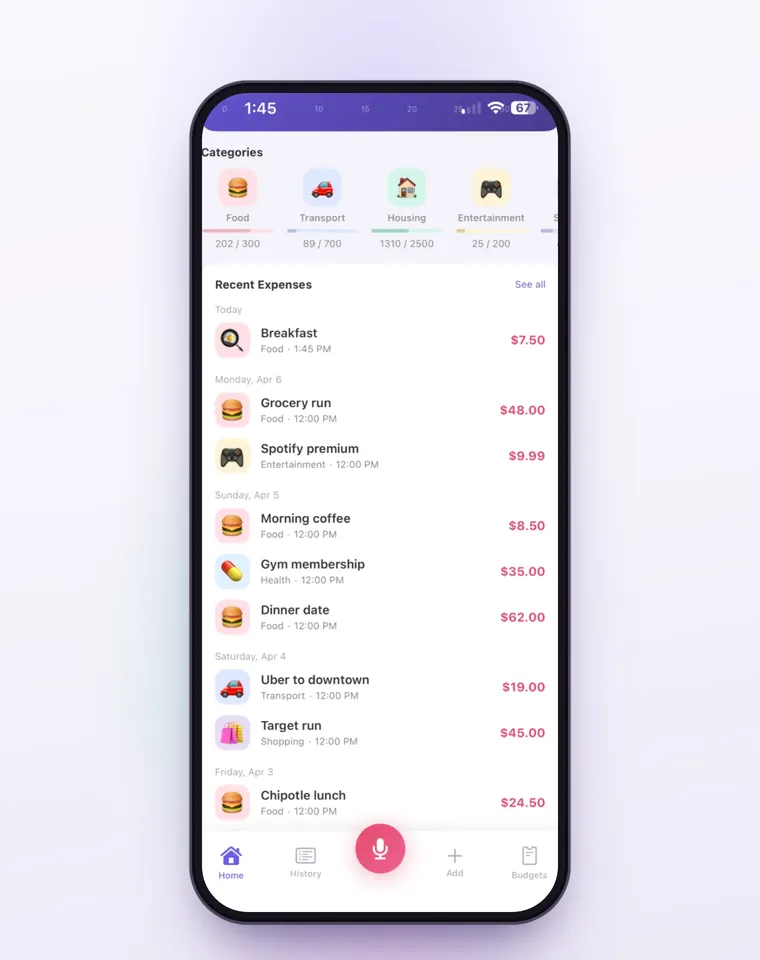
Each payment Bujit adds counts toward its category, so a budget you set in Budgets already includes your rent or gym once they're added that month. On iPhone, a Shortcuts automation can log Apple Pay purchases when you tap your iPhone to pay; a payment a company takes from your card on its own isn't a tap, so set those up as recurring instead. Voice entry and receipt scanning are part of Bujit Pro; they send what they need to Google Gemini, and only after you agree. Your expenses are stored on your phone.
Which should you use?
- You want to find every recurring payment once: 12 months of bank and card statements, then Apple's Subscriptions, Google Play and PayPal.
- You want to cancel one: the company that charges you, or Settings for a subscription Apple bills you for.
- You want to stop a payment from your bank account: tell the company and your bank, and give your bank a stop payment order at least three business days ahead if you need one.
- You want them with a monthly total, next to the rest of your spending: an expense app like Bujit, with each payment set to repeat.
Whatever you use, look at the list on the same day each month, such as the day after payday. Recurring payments are the part of your budget you decide once, so they're the part most worth deciding again.
Questions people ask
What are recurring payments?
Charges that repeat on a schedule after you agree to them once: rent or a mortgage, a phone plan, insurance, a gym, streaming and app subscriptions, a loan. Some are the same amount every time; others, like an electric bill paid automatically, change from month to month. Some repeat weekly or yearly rather than monthly.
What's the difference between recurring payments and subscriptions?
A subscription is one kind of recurring payment: a service you pay for on a schedule until you cancel it, such as streaming or an app. Recurring payments also include bills and loans, like rent, a mortgage and a car payment, which you usually can't simply cancel.
How do I find all my recurring payments?
Start with 12 months of statements for your checking account and every credit card, and mark each charge that repeats: same company, a similar amount, around the same date. Twelve months catches the yearly ones. Then check the subscriptions Apple, Google Play and PayPal bill you for, since their charges can show on your statement under their name rather than the service's.
How do I see recurring payments on my iPhone?
Settings shows the subscriptions Apple bills you for: open Settings, tap your name, then tap Subscriptions. Recurring payments to other companies, such as rent, insurance or a gym, aren't in that list; your bank or card statement shows those.
How do I stop a recurring payment from my bank account?
The Consumer Financial Protection Bureau says to call the company and tell it you're taking away its permission to take automatic payments, then do the same with your bank, and follow up both calls in writing. You can also give your bank a stop payment order at least three business days before the payment is scheduled; banks commonly charge a fee for it.
Can my bank show me my recurring payments?
Some banks' apps can. Capital One's app, for example, has an Expected Transactions tool that picks out recurring charges and subscriptions on eligible Capital One accounts. It can take a few billing cycles to find them, and it only sees that bank's accounts, so payments on your other cards still need checking.
How do I keep track of recurring payments?
Keep one list with each payment's name, amount, how often it repeats and its next date, and work out what each costs a month: a yearly payment divided by 12. Check the list against your statement once a month for price changes. An expense app that repeats each payment for you, like Bujit, keeps the total next to the rest of your spending.
Sources
- Cancel a subscription from Apple (Apple Support) (checked Nov 21, 2026)
- Cancel, pause, or change a subscription on Google Play, Android phone and tablet (Google Play Help) (checked Nov 22, 2026)
- Find your purchases, reservations & subscriptions, Android phone and tablet (Google Account Help) (checked Nov 22, 2026)
- What is an automatic payment and how do I update or cancel one? (PayPal Help) (checked Nov 21, 2026)
- How do I stop automatic payments from my bank account? (Consumer Financial Protection Bureau) (checked Nov 21, 2026)
- How can I stop a payday lender from electronically taking money out of my bank or credit union account? (Consumer Financial Protection Bureau) (checked Nov 21, 2026)
- Managing expected transactions (Capital One Help Center) (checked Nov 21, 2026)