Quick answer
Open the Google Wallet app on Android, tap View more, then View more transactions to see your Google Pay history, and tap one for its details. On a computer, go to wallet.google.com and click Transactions at the top left. Google Play, YouTube and Google One purchases are at payments.google.com instead, and your bank statement has the full record.
- Where
- Google Wallet, View more transactions
- On a computer
- wallet.google.com, Transactions
- Google purchases
- payments.google.com, Activity
- Full record
- Your bank statement
On this page
- How to see Google Pay transaction history on Android
- On the Google Wallet website and a Wear OS watch
- Google Play, YouTube and other Google purchases
- What happened to the Google Pay app
- How to download or delete your Google Pay history
- What Google Wallet doesn't show you
- How to log Google Pay purchases in Bujit on Android
- Which should you use?
- Questions people ask
- Sources
How to see Google Pay transaction history on Android
Google Pay is how you pay, in stores, online and in apps. Google Wallet is the app that holds your cards, and it's where your history lives. Tap to pay works on Android devices only, so the Google Wallet app on your Android phone is where to look for the purchases you tapped your phone to pay for.
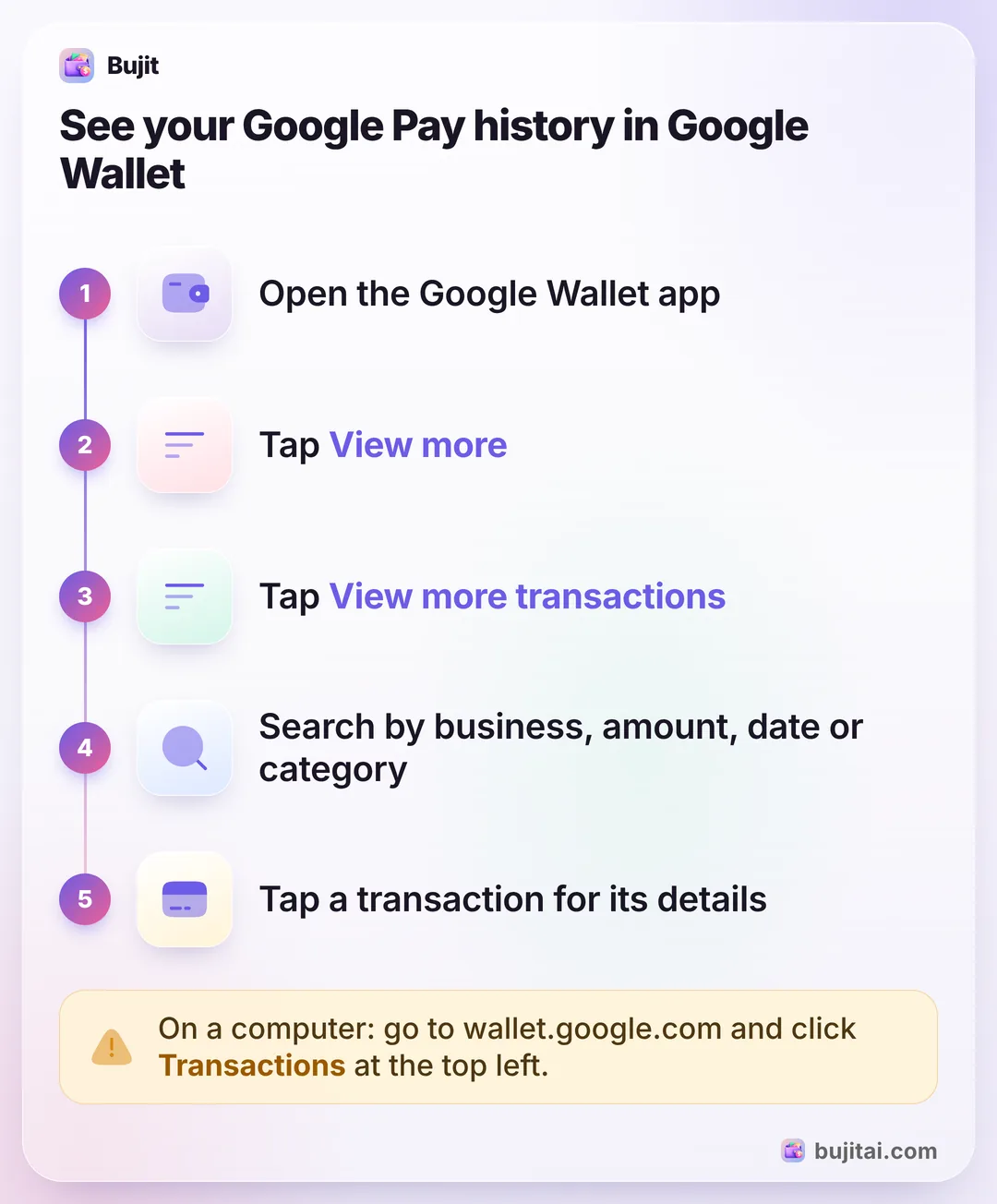
- Open the Google Wallet app.
- Tap View more.
- Tap View more transactions. To find a specific one, use the search bar.
- Tap a transaction for its details, which may include the method and device you paid with.
For security, Google Wallet hides your transactions until you verify it's you. Adding a screen lock to your phone means it asks less often.
To see the purchases for one card, open Google Wallet, tap the card, then tap View more transactions. In search, you can look for a business name, an amount, a date or time period, or a category.
Want to see where you paid? Turn on location for Google Wallet: open your phone's Settings app, tap Apps, then Google Wallet, then Permissions, and for Location choose Allow only while using the app. New tap-to-pay transactions then come with their location.
On the Google Wallet website and a Wear OS watch
On a computer, go to wallet.google.com, click Transactions at the top left and select a transaction for its details. The most recent ones show first; for older ones, click View more transactions. Google's examples of what it lists are contactless payments made with your Android device, virtual card transactions made online and, in the US only, transactions from accounts linked through Plaid and purchases Gemini made for you. The old pay.google.com address now takes you to the same website.
On a Wear OS watch, open the Google Wallet app, tap a card, then swipe up on the card to see its transactions. A card you add on the watch is added only to the watch's Google Wallet app, not your phone's.
On an iPhone, Google Wallet arrived in the US on November 17, 2026, for managing your cards and checking out online with Google Pay. Tap to pay isn't supported on iOS, so there's no tap-to-pay history there. For purchases you tap your iPhone to pay for, see where Apple Pay purchases show up in the iPhone's Wallet app.
Google Play, YouTube and other Google purchases
Purchases from Google itself aren't in Google Wallet. For Google Play, YouTube and Google One charges, go to payments.google.com, click Activity, then select a transaction. For subscriptions, click Subscriptions & services there, find the one you want and click Manage.
Purchases and reservations you make with Search, Maps or Google's assistants are in your Google Account: on a computer, open your Google Account, click Wallet & subscriptions on the left, then Manage purchases. If you're hunting for a charge that repeats, finding every recurring payment, Google Play included walks through the other places to look.
What happened to the Google Pay app
In the US, the standalone Google Pay app stopped working on June 4, 2024. Tapping to pay in stores and managing your payment methods moved to Google Wallet, and the Google Pay button works as before when you check out online. Since then, you can't send, request or receive money from other people through the US version of the app.
Money left in a US Google Pay balance can still go to a linked bank account: on the Google Wallet website, click Payment Methods, then Money in Google Pay or Google Pay balance, then Transfer out. Enter the amount, choose the bank account and click Transfer out again. Outside the US, the Google Pay app is still used in India and Singapore. In India, open it and scroll to See transaction history.
How to download or delete your Google Pay history
To keep a copy, export it with Google Takeout:
- On a computer, go to takeout.google.com and sign in to your Google Account.
- In the list of products, select Google Wallet. For your Google Pay data too, make sure Google Pay is selected. Turn off anything you don't want to export.
- Click Next step, choose the file type, frequency and destination, then click Create export.
You can change which types of data are included, but you can't pick a date range. Once it's ready, your archive expires in about 7 days.
To delete specific payments, go to myactivity.google.com, find the date, tap Details under the activity and delete what you don't want. This removes it from your Google Account, and deleting tap activity also deletes those in-store taps from your device. Google says it keeps some info for regulatory purposes. By default, Google Pay activity in My Activity that's older than 18 months is deleted automatically; at myactivity.google.com/product/gpay you can change that to 3 or 36 months, or turn it off.
What Google Wallet doesn't show you
Google Wallet is a list of payments. That's enough to check a charge, and it stops there:
- It isn't the full record. Merchants don't always share every purchase detail with Google Wallet, and Google tells you to check your bank statement for the full transaction details.
- Some transactions don't stay. Some may be on the Wallet website only for a short time, and if you remove a card or pass, you may lose its transaction history.
- Look for refunds on your statement. Google says refunds don't appear in your Google Wallet transaction history, and that a refund can take up to 2 to 4 weeks to reach your bank or card statement.
- Cash isn't in it, and neither is a card you never added to Google Wallet, apart from US accounts you linked through Plaid, which show on the website.
- There are no budgets. You can't set a monthly limit for eating out, or for anything else.
| Google Wallet | Bujit | |
|---|---|---|
| Recent Google Pay purchases | On Android, from Google Wallet's payment notifications | |
| Cash in the same list | ||
| Budgets and categories | ||
| Needs an account | A Google Account | No account |
How to log Google Pay purchases in Bujit on Android
Bujit, the expense tracker we make, has a Google Pay tracking option on Android. It's off by default. When you turn it on and give Bujit notification access, it reads the notifications the Google Wallet and Google Pay apps send, and Google Gemini picks out the payments to turn into expenses.
In Bujit
Get Bujit- Turn on Bujit's AI features: agree on the AI disclosure screen when it appears, or later in Bujit's Settings, under Privacy, then AI Features. Google Pay tracking needs them.
- Turn on Google Pay tracking in Bujit.
- Give Bujit notification access on your phone.
- Keep Google Wallet's purchase notifications on. Bujit can only read a notification that Google Wallet sends. To check, open Google Wallet, tap your profile picture or Account, then Wallet settings, and turn purchase notifications on.
- Pay with Google Pay as usual, and add cash purchases in Bujit by typing them in.
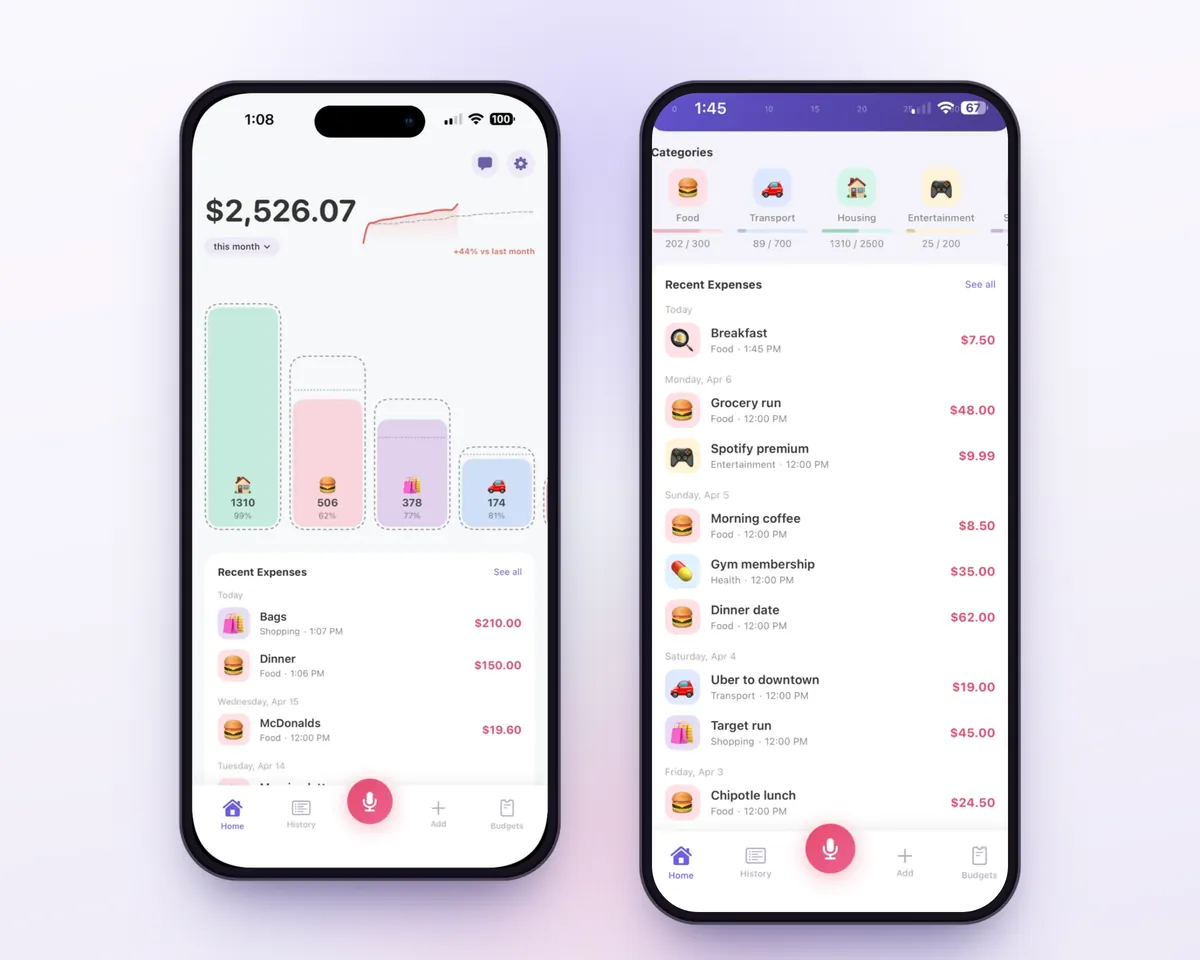
Here's what leaves your phone. Bujit ignores notifications from every other app and doesn't send them anywhere. For each Google Wallet or Google Pay notification, its title and message, which can include the merchant, the amount and the card, go with your phone's region and Bujit's currency and language to Bujit's server and on to Google Gemini. Gemini decides whether it's a payment and pulls out the details. Bujit's server also gets the app's anonymous ID, which it uses to check each request and count it toward Bujit's daily limits on AI features, and it doesn't pass that ID on to Google. To stop it, turn off Google Pay tracking in Bujit or remove Bujit's notification access in Android Settings; turning AI features off stops it too. Your expenses are stored on your phone, and Bujit has no bank connection and no account.
Which should you use?
- Checking one charge: Google Wallet. Tap View more, then View more transactions, then the transaction.
- The exact, complete record for a card: your bank or card statement. For an American Express card in the US, Google sends you to your statements or the American Express app.
- A Google Play, YouTube or Google One charge: payments.google.com, then Activity.
- Knowing where your money goes each month, cash included, with budgets: Bujit on Android, with Google Pay tracking doing the logging. If you're starting from zero, the basics of tracking your expenses covers the habit itself.
Questions people ask
Where is my Google Pay transaction history?
In Google Wallet. On your Android phone, open the Google Wallet app, tap View more, then View more transactions, and tap a transaction for its details. On a computer, go to wallet.google.com and click Transactions. Purchases from Google Play, YouTube and Google One aren't there: find them under Activity at payments.google.com.
Why can't I see all my Google Pay transactions?
Google says merchants don't always share every purchase detail with Google Wallet, and that some transactions may only stay on the Wallet website for a short time. If you remove a card, you may lose its history, and Google says refunds don't appear in your Google Wallet transaction history. Google points you to your bank statement for the full transaction details.
What happened to the Google Pay app?
In the US, the standalone Google Pay app stopped working on June 4, 2024. Tapping to pay in stores and managing your cards moved to Google Wallet, and the Google Pay button still works when you check out online. The Google Pay app is still used in India and Singapore.
Can I see Google Pay purchases on my watch?
Yes, on a Wear OS watch. Open the Google Wallet app on the watch, tap a card, then swipe up on the card to see its transactions. A card you add on the watch is added only to the watch, not to your phone.
Can I download my Google Pay history?
You can export a copy of your Google Pay and Google Wallet data with Google Takeout. On a computer, go to takeout.google.com, select Google Wallet and Google Pay in the list of products, click Next step, choose the file type, frequency and destination, then click Create export. Takeout can't export just one date range.
How do I delete my Google Pay activity?
Go to myactivity.google.com, find the date, tap Details under the activity and delete what you no longer want. By default, Google Pay activity in My Activity that's older than 18 months is deleted automatically, and you can change that to 3 or 36 months, or turn it off. Google says it keeps some info for regulatory purposes.
Can Bujit track my Google Pay purchases?
On Android, yes, if you turn on Google Pay tracking. With AI features on and notification access granted, Bujit reads notifications from the Google Wallet and Google Pay apps, and Google Gemini picks out the payments and their details, which become expenses. On iPhone, a Shortcuts automation can log the Apple Pay purchases you tap your iPhone to pay for instead.
Sources
- View transactions on the Google Wallet app (Google Wallet Help) (checked Nov 22, 2026)
- View transactions on the Google Wallet website (Google Wallet Help) (checked Nov 22, 2026)
- About Google Wallet (Google Wallet Help) (checked Nov 22, 2026)
- Tap to pay with your smartwatch (Google Wallet Help) (checked Nov 22, 2026)
- Pay on an app or website (Google Pay Help) (checked Nov 22, 2026)
- Find your Google purchase history (Google Pay Help) (checked Nov 22, 2026)
- Find, export, or delete Google Pay & Google Wallet info (Google Pay Help) (checked Nov 22, 2026)
- Transfer money out of Google Pay, US only (Google Pay Help) (checked Nov 22, 2026)
- Simplifying our payment apps in the U.S. (Google blog) (checked Nov 22, 2026)
- Google Wallet is now available on iOS in the U.S. (Google blog) (checked Nov 22, 2026)
- Tap to pay with your phone (Google Wallet Help) (checked Nov 22, 2026)
- Find your purchases, reservations & subscriptions, Computer (Google Account Help) (checked Nov 22, 2026)
- How to download your Google data (Google Account Help) (checked Nov 22, 2026)