Quick answer
A budget app without bank account access never asks for your bank login. You add each purchase yourself, by typing or, in some apps, by voice or receipt scan, so cash counts too and nothing goes through a service like Plaid. Each purchase takes a few seconds. Bujit can also log Apple Pay when you tap your iPhone to pay.
- Bank login
- Never asked for
- How purchases get in
- You add each one yourself
- Cash
- Counts like any other purchase
- The trade-off
- A few seconds per purchase
On this page
How a budget app without bank account access works
A budget app without bank account access works from what you put in, not from a feed from your bank. Most budgeting apps that pull in transactions on their own connect through a service such as Plaid. You prove each account is yours by signing in with your bank username and password, Plaid retrieves the account information you agreed to share from your bank, and it passes that on to the app. Plaid says more than 7,000 apps and services use it, and that 1 in 2 US adults has connected an account through it.
An app without that connection skips all of it. Nothing signs in to your bank, so you become the feed: every purchase goes in because you add it. That's the whole method, and it works the same in a notebook, a spreadsheet or an app.
- Pick one place for every purchase. One app, notebook or sheet, for cards, cash and anything else. Two places means two half-pictures.
- Log each purchase when you pay. The amount, what it was and a category such as Food or Transport. At the register it takes seconds; by Sunday it's guesswork.
- Count cash the same way. Cash is the spending a bank feed never sees, so it's the part a by-hand tracker gets right. Tracking cash spending covers the habits that keep it from slipping through.
- Check your card statement once a week. Compare the week's card purchases with what you logged and add anything you missed. Ten minutes a week keeps the record whole.
- Give each category a limit. Once a month is logged, you know what each category really costs, and a limit per category tells you what's left before the month ends.
If you're starting from scratch, four ways to track your expenses compares the notebook, the spreadsheet, your bank app and an expense app in more detail.
If you don't have a bank account at all
A budget only needs to know what comes in and what goes out, not where the money sits. The FDIC's 2023 household survey found that 4.2% of US households, about 5.6 million, were unbanked, meaning no one in the household had a checking or savings account at a bank or credit union. It also found that 5.9% of all households were using prepaid cards.
A bank-linked app loses its main feature there, because there's nothing to link. An app that works from what you enter can: log each cash purchase when you pay, log prepaid card purchases the same way, and keep bills you pay with money orders in the same list. If most of your money is cash, envelope budgeting splits it into a fixed amount per category before the month starts.
If you've already linked a bank to an app
You don't have to delete everything to change your mind. If the app connected through Plaid, Plaid Portal at my.plaid.com shows the types of data you've shared through Plaid and lets you control ongoing access to it. Your bank's own app or website may also list connected apps. Then check the budgeting app's own settings for how to delete your data there.
What you give up without a bank feed
- Card purchases don't arrive by themselves. A purchase you forget to add is missing until you notice it, which is why the weekly statement check matters.
- Refunds and returns are yours to add too. Log them as they happen, or the category looks fuller than it is.
- You don't see balances. An app without a bank connection knows what you spent, not what's left in your account. Your bank's own app still does that.
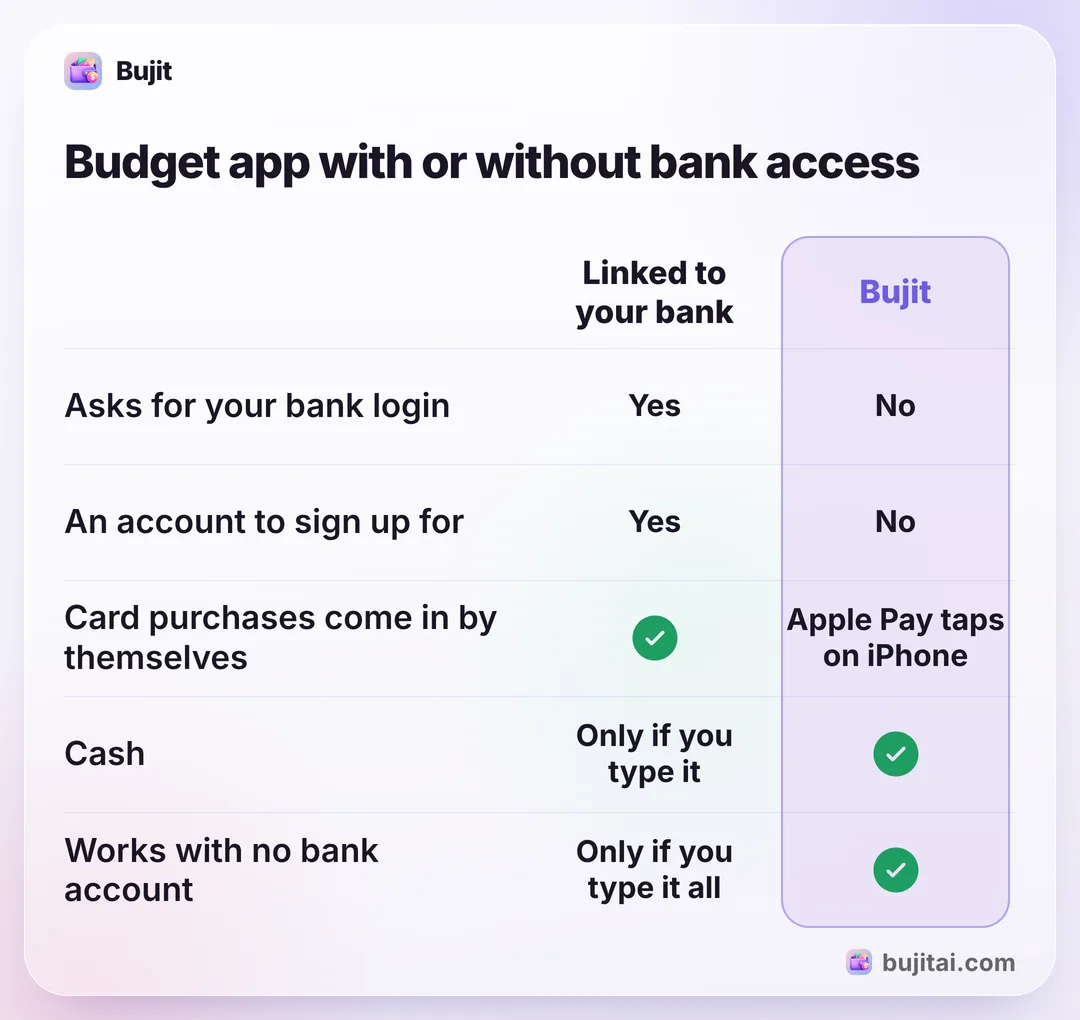
| Notebook | Spreadsheet | Bank-linked app | Bujit | |
|---|---|---|---|---|
| Asks for your bank login | No | No | Yes | No |
| An account to sign up for | No | Only for online sheets | Yes | No |
| Card purchases come in by themselves | Apple Pay taps on iPhone | |||
| Counts cash | Only if you type it | |||
| Adds up each category for you | With formulas | |||
| Works with no bank account | Only if you type it all |
How to track spending in Bujit without a bank login
Bujit, the expense tracker we make, has no bank connection and no account. You add each purchase in a few seconds, and it lands in the month with its category.
In Bujit
Get Bujit- Type it. Tap + at the top right, then Manual Entry. Enter the amount, type what it was for, pick a category and tap Save.
- Or say it. Tap the microphone and say it the way you'd tell a friend: "breakfast, seven fifty". Bujit fills in the amount, a note and the category, and you can say a few purchases at once.
- Or scan the receipt. Tap +, then Scan Receipt, and take a photo or choose one you already have. Bujit reads the store, the total and the date.
- Let Apple Pay log itself. On iPhone, a Shortcuts automation can log each Apple Pay purchase you tap your iPhone to pay for. You set it up once, starting from the gear on Home, then Track Apple Pay. iOS 27 moved automations inside each shortcut, so logging Apple Pay purchases automatically has the steps for each iOS version.
- Check the month. Home shows the month's total and spending by category, and Budgets shows how much of each category's limit is gone.
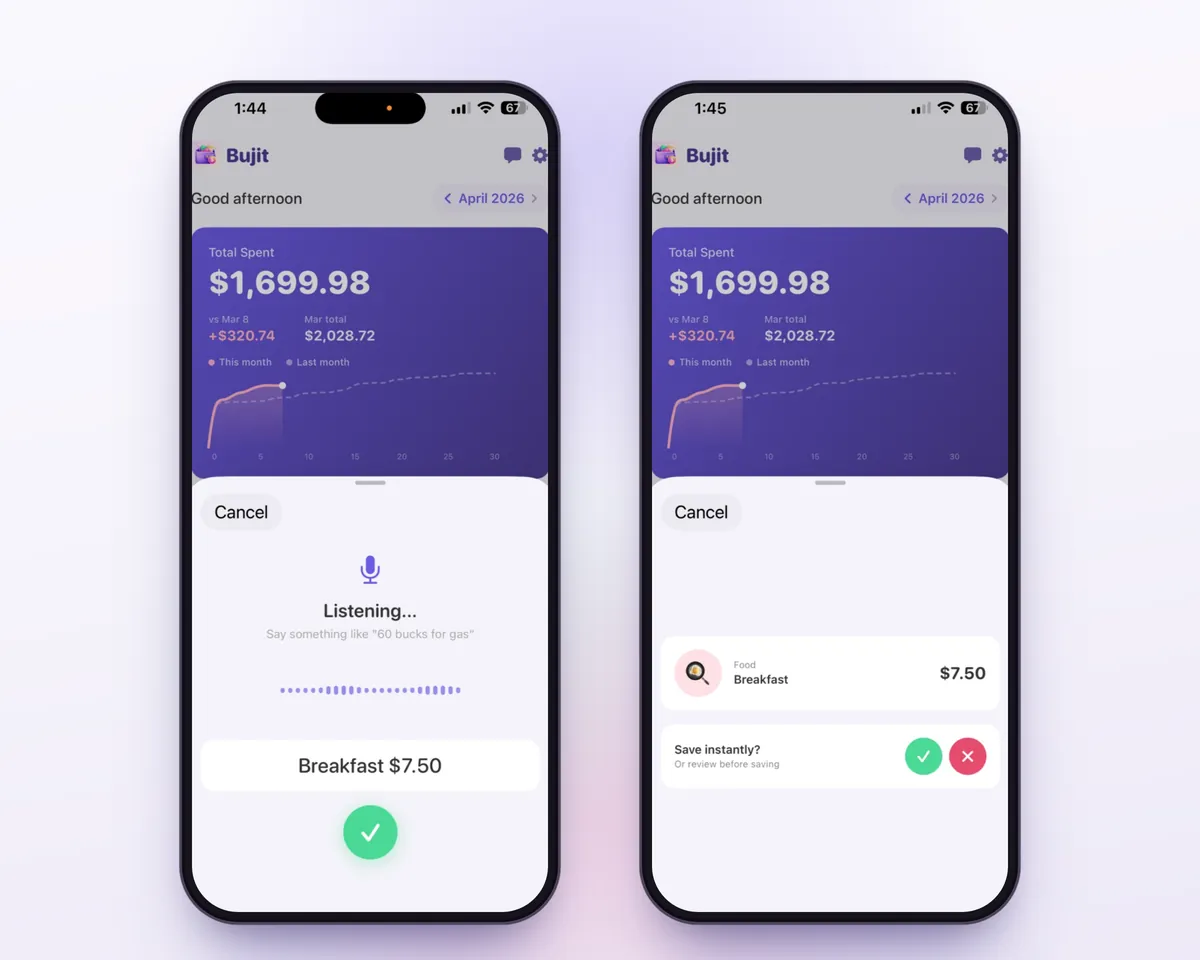
Apple Pay purchases logged by the automation are sorted into a category on your phone from the merchant's name, and nothing about them goes to an AI service. Voice entry and receipt scanning are part of Bujit Pro. They, and the AI chat when you ask it about your spending, send what they need to Google Gemini, only after you agree. Your expenses are stored on your phone, and the app doesn't sync them to our servers.
Which should you use?
- You want nothing digital and don't mind doing the sums: a notebook, checked against your statement every Sunday.
- You like formulas and want the whole year on one screen: a spreadsheet, updated every couple of days.
- You're comfortable sharing your bank login and pay almost everything by card: a bank-linked app saves the typing, but add your cash by hand. Many now add an AI assistant too; here's how to pick an AI budget app.
- You want no bank login, cash and cards in one list, and a few seconds per purchase: an app that works from what you enter, like Bujit.
Whichever you pick, give it a full month before you judge it. The first month shows where your money goes; the second is when the limits start to fit.
Questions people ask
Is there a budget app that works without your bank login?
Yes. Expense trackers that work from what you enter never ask for a bank login. You type in each purchase, or in some apps say it or scan the receipt, and the app adds it up by category. Bujit works this way, with no bank login and no account.
Is it safe to link my bank account to a budgeting app?
Most budgeting apps that link banks use a service such as Plaid. You prove the account is yours by signing in with your bank username and password, and the service passes the account information you agreed to share on to the app. Plaid says it encrypts that data and lets you see and cut off access in Plaid Portal. If you'd rather not hand that connection to anyone, track by hand.
Can I budget if I don't have a bank account?
Yes. A budget only needs to know what comes in and what goes out, not where it's kept. Write down each cash or prepaid card purchase when you pay, or log it in an app that doesn't need a bank, and add it up each week. The FDIC's 2023 survey estimated that about 5.6 million US households had no bank account.
How do I see which apps I've already linked to my bank?
If the app used Plaid, Plaid Portal at my.plaid.com shows the types of data you've shared through Plaid and lets you control ongoing access to it. Your bank's own app or website may also list connected apps.
What do I lose without bank syncing?
Card purchases don't arrive by themselves, so a purchase you forget to add is missing until you notice it. Logging each one when you pay, and checking your card statement once a week, closes most of that gap. Bujit can log Apple Pay purchases when you tap your iPhone to pay, through a Shortcuts automation you set up once.
Does Bujit need my bank login?
No. Bujit has no bank connection and no account. Your expenses are stored on your phone, and the app doesn't sync them to our servers. Voice entry and receipt scanning are part of Bujit Pro. They and the AI chat send what they need to Google Gemini, only after you agree.
Sources
- How we handle your financial data (Plaid) (checked Nov 7, 2026)
- 2023 FDIC National Survey of Unbanked and Underbanked Households (FDIC) (checked Nov 7, 2026)
- Add automations to Shortcuts on iPhone or iPad (Apple Support) (checked Nov 7, 2026)