Quick answer
An AI budget app uses AI for the tedious parts of budgeting: sorting purchases into categories, answering questions about your spending in plain words, and in some apps turning what you say or photograph into an expense. Most ask for your bank login first. Bujit doesn't: you say, scan or type purchases, then ask about your totals.
- What the AI does
- Sorts, explains, suggests, logs
- What it works from
- Your bank data, or what you enter
- Check before you agree
- What it sends, and to which AI
- What it can't do
- Decide what you spend
On this page
What an AI budget app does
An AI budget app is a budgeting app that hands some of the work to AI models. Look past the label and the AI does one or more of four jobs:
- Sorts your transactions. In Monarch, AI categorizes transactions, cleans up merchant names and spots recurring charges. Copilot Money's assistant fixes wrong categories and matches refunds to the purchase they belong to.
- Answers questions in plain words. Ask why spending went up or where you're overspending, and get a sentence instead of a report. Monarch's AI Assistant answers questions about spending, cash flow and net worth, and in Copilot Money you can tap a transaction or category to ask about it.
- Suggests changes. Copilot Money suggests moving money between categories when your spending shifts. Monarch looks for ways to save, like a better price on a subscription, and sums up each week in a Weekly Recap. Cleo calls out bad habits with brutally honest spending advice.
- Logs purchases for you. Some apps turn a sentence, a voice note or a receipt photo into an expense. Bujit, for one, takes what you say or a photo of the receipt. If most of what you log starts as a receipt, here's which receipt scanner app fits the job.
The first three need a list of purchases to work on, and most apps get it from your bank. Cleo and Monarch connect accounts through services such as Plaid, and Copilot Money says it works with more than 16,000 institutions. The fourth job is for people who'd rather fill in the list themselves, the way budgeting with no bank login works, just faster.
How to choose an AI budget app
- Decide how purchases get in. Linking your bank brings card purchases in by themselves. Entering them yourself means no bank login, and cash gets counted too. This choice narrows the list more than any AI feature.
- Ask it a real question. In the free version or the trial, ask what you'd really want to know, like "What did I spend on eating out this month?", then check the answer against your statement.
- Find out what it sends to an AI model. Look for the app's AI or privacy page. Monarch, for one, says it sends only the data a task needs, like the transactions behind your question, to models from companies such as OpenAI, Anthropic and Google, and that those providers can't train on your conversations.
- Check that you can turn it off. In Monarch, the AI Assistant, Insights and Weekly Recap can be hidden in Settings > Preferences; its AI categorization stays on. In Bujit, AI features stay off until you agree, and you can switch them off again under AI Features in Settings.
- Read the price after the trial. Some apps are free with paid plans, some are paid after a free first week, and some have a single paid plan. Weigh it against the time the AI saves you.
What AI can't do for your budget
- It can be wrong. A category can be off and an answer can miss something. Monarch's own help pages say AI can make mistakes and that its assistant isn't financial advice. Check a surprising answer against the transactions behind it.
- It only knows what it sees. A bank-linked app sees your cards but not the cash you spend; an app you fill in yourself sees only what you enter. That's why the habit of logging every purchase still matters with AI.
- Its answers are only as clear as your categories. "Other" can't tell you much. A category list that matches how you spend makes every answer sharper.
- It doesn't spend less for you. Knowing that eating out came to $410 helps only if something changes next month. Habits that put a pause before you pay do that part.
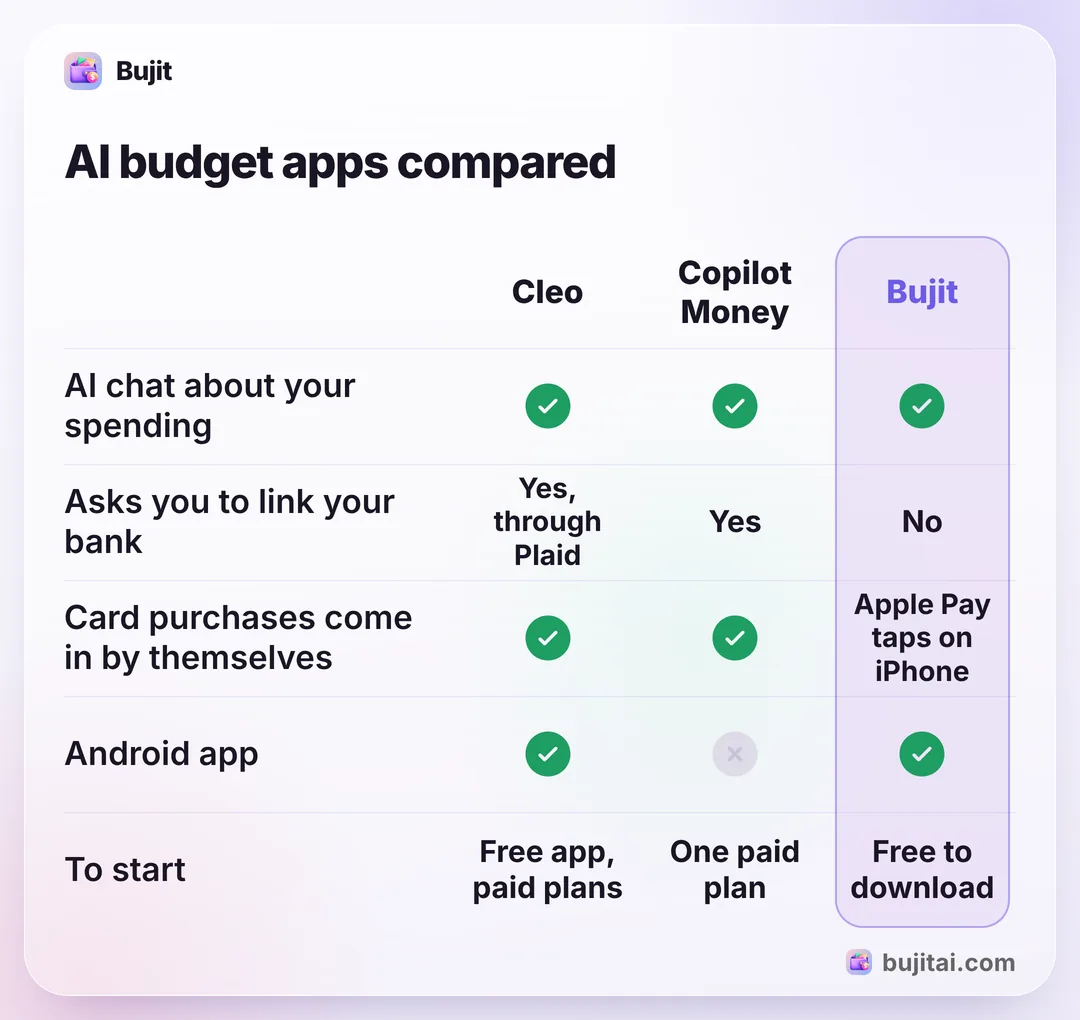
| Cleo | Copilot Money | Monarch | Bujit | |
|---|---|---|---|---|
| Asks you to link your bank | Yes, through Plaid | Yes, 16,000+ institutions | Yes, through Plaid, MX or Finicity | No |
| AI chat about your spending | ||||
| What the AI adds | Blunt spending advice | Fixes categories, suggests budget changes | Categories, insights, weekly recap | Turns voice and receipts into expenses |
| Card purchases come in by themselves | Apple Pay taps on iPhone | |||
| Beyond budgeting | Savings, credit building, debt plan | Investments and net worth | Investments, net worth and goals | Spending and budgets only |
| Works on | iPhone, Android | iPhone, iPad, Mac, web | iPhone, Android, web | iPhone, Android |
| To start | Free app, paid plans | One paid plan | First week free, then paid | Free to download, optional Pro |
How to use Bujit's AI to log and check your spending
Bujit, the expense tracker we make, uses AI for two things: getting each purchase in, and answering questions about your totals. It has no bank connection and no account.
In Bujit
Get Bujit- Agree to the AI features once. Bujit asks during setup or the first time you use an AI feature. Until you agree, nothing goes to an AI service, and you can turn them off again under AI Features in Settings.
- Say what you spent. Tap the microphone and say it the way you'd tell a friend: "lunch, twelve fifty". Bujit fills in the amount, a note and the category, and you can say a few purchases at once.
- Or scan the receipt. Tap + at the top right, then Scan Receipt, and take a photo or choose one you already have. Bujit reads the store, the total and the date.
- Ask about your spending. On Home, tap the speech bubble at the top right, next to the gear. Pick a suggestion like What's my biggest category? or type your own question.
- Let Apple Pay log itself. On iPhone, a Shortcuts automation can log each Apple Pay purchase you tap your iPhone to pay for. You set it up once, starting from the gear on Home, then Track Apple Pay; logging Apple Pay purchases automatically has the steps for each iOS version.
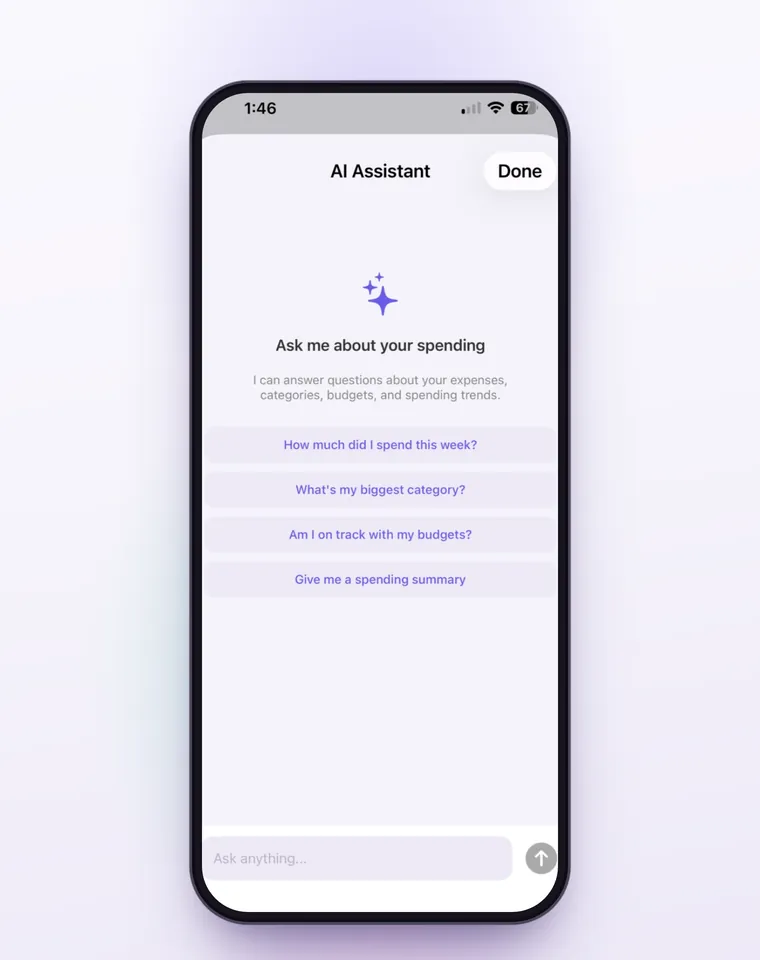
On iPhone, the AI chat works from the period picked on Home plus this week and this month: your totals by period, category and day, your budgets, and up to 20 recent expenses, so questions about totals and categories work best. Apple Pay purchases logged by the automation are sorted into a category on your phone from the merchant's name, and nothing about them goes to an AI service. Voice entry, receipt scanning and the AI chat are part of Bujit Pro. They send what they need to Google Gemini, only after you agree, and your expenses are stored on your phone.
Which should you use?
- You want your whole financial picture, investments included, and you're fine linking accounts: Copilot Money on Apple devices and the web, or Monarch on iPhone, Android and the web.
- You want a coach that talks back, plus savings and credit tools: Cleo.
- You'd rather not link a bank and want each purchase to take a sentence: an app where the AI does the logging, like Bujit.
- You only want to see where the money goes: any of them can do it. The app you'll open every day matters more than how clever its AI is.
Whichever you try, ask it after a month the question you asked on day one. If the answer is clearer, it's earning its place.
Questions people ask
What is the best AI budget app?
It depends on how you want purchases to get in. If you're happy to link your bank, Copilot Money (iPhone, iPad, Mac and web) and Monarch (iPhone, Android and web) pair bank syncing with an AI assistant, and Cleo adds a chatty coach with savings and credit tools. If you'd rather not link a bank, pick an app where the AI does the logging, like Bujit.
Do AI budget apps need my bank login?
Most do. Cleo, Copilot Money and Monarch work from your bank and card data, so you connect your accounts first. Apps built around logging what you type, say or photograph work from what you enter instead. Bujit has no bank connection at all.
Is it safe to use an AI budgeting app?
Check two things: how it reaches your bank, and what it sends to an AI model. Cleo and Monarch connect accounts through services such as Plaid. Monarch says it sends AI models only the data a task needs, like the transactions behind your question, and that its AI providers can't train on your conversations, though Monarch itself may use them, with details that identify you removed, to train models only it uses. Read the app's own AI or privacy page before you agree.
Can an AI budget app make mistakes?
Yes. A category can be wrong and an answer can miss something. Monarch's help pages say its AI can make mistakes and that its assistant isn't financial advice. Check a surprising answer against the transactions behind it before you act on it.
Does Bujit's AI see my bank account?
No. Bujit has no bank connection and no account, and its AI features stay off until you agree. Voice entry sends what you say and receipt scanning sends the photo to Google Gemini to turn it into an expense; on Android, Deepgram turns your voice into text first. The AI chat sends your question, the recent conversation, your spending totals and budgets, and up to 20 recent expenses. On Android, optional Google Pay tracking also sends the text of Google Wallet payment notifications. Your expenses are stored on your phone.
Sources
- Cleo: Money talks. Cleo talks back. (Cleo) (checked Nov 10, 2026)
- Cleo plans and pricing (Cleo) (checked Nov 10, 2026)
- Copilot Money (Copilot) (checked Nov 10, 2026)
- About Monarch's AI Features (Monarch Help Center) (checked Nov 10, 2026)
- AI in Monarch (Monarch Help Center) (checked Nov 10, 2026)
- Monarch: the modern way to manage money (Monarch) (checked Nov 10, 2026)
- Monarch pricing (Monarch) (checked Nov 10, 2026)