Quick answer
A receipt scanner app reads the shop, the date and the total from a photo of a receipt, so you don't type them in. Pick one by what the receipt is for: Expensify for work expense reports, SimplyWise for small-business tax records, Fetch for reward points, and Bujit for counting it in your monthly spending.
- What it reads
- Shop, date and total
- Free on iPhone
- Notes: a PDF, with no totals
- Pick by
- What the receipt is for
- Check first
- Where your receipts are stored
On this page
What a receipt scanner app does
A receipt scanner app reads a photo of a receipt and pulls out the shop, the date and the total, so you don't type them in. What matters is the next step, and that's where the apps split into four kinds:
- Work expense reports. Expensify's SmartScan reads the merchant, date, total and currency, attaches the receipt to the expense and adds it to the right report. If you paid with a card linked to Expensify, it matches the receipt to that card charge, and it syncs to QuickBooks, NetSuite, Xero and more than 45 other platforms.
- Tax records for a small business. SimplyWise says it reads the merchant, date, total, tax and line items, files each receipt in an expense category and keeps the image with it. You can forward email receipts in, and at tax time it exports the set to a spreadsheet or a report. It's built for contractors and small businesses.
- Reward points. Fetch turns receipts into points you redeem for gift cards, so you'd use it alongside a way to track what you spend.
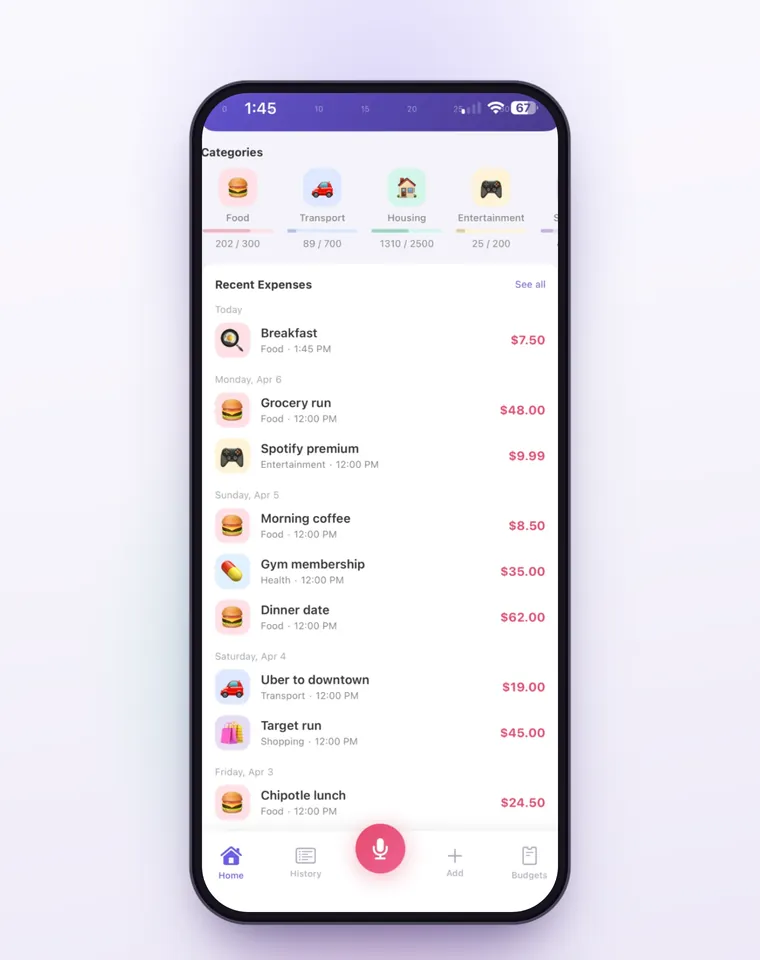
- Your monthly spending. Bujit reads the shop, the amount and the date, picks a category, and saves the receipt as an expense, counted in the month's totals and budgets alongside everything else you spend.
If you're new to keeping tabs on your money, building the habit of logging every purchase matters more than which scanner you choose, because plenty of purchases come without a receipt.
The free way: scan a receipt in Notes on iPhone
Your iPhone already has a document scanner, in the Notes app. These steps follow Apple's support page.
- Open Notes and open a note, or create a new one.
- Tap the Attachment button, then tap Scan Documents.
- Hold the receipt in view of the camera. In Auto mode, your iPhone scans it by itself. To take it yourself, tap the Shutter button, drag the corners to fit the receipt, then tap Keep Scan.
- Tap Done, or scan more receipts first. Every page you scan before Done goes into the same document in the note.
Files can scan the same way, and every free way to scan receipts on iPhone has the steps for Notes, Files and Preview. What you get is a picture of the paper, saved in the note. It doesn't know the shop, the total or the date, and nothing adds it to a monthly total.
What to check before you pick a receipt scanner app
- What it does after reading. An expense report, a folder for taxes, points or a budget. Each app is built around one of these jobs.
- Where your receipts are stored. SimplyWise stores receipts in its cloud. Expensify attaches each receipt to its expense and has a web app you can drag receipts into. Bujit keeps the expense and the receipt photo on your phone.
- What else it asks to connect. SimplyWise can connect your QuickBooks and Amazon accounts to import orders. Expensify matches receipts to a card you've linked to it. Bujit has no bank connection and no account.
- Who reads the photo. Reading a receipt usually means the photo goes to the app's servers. Bujit sends it to Google Gemini, and only after you agree.
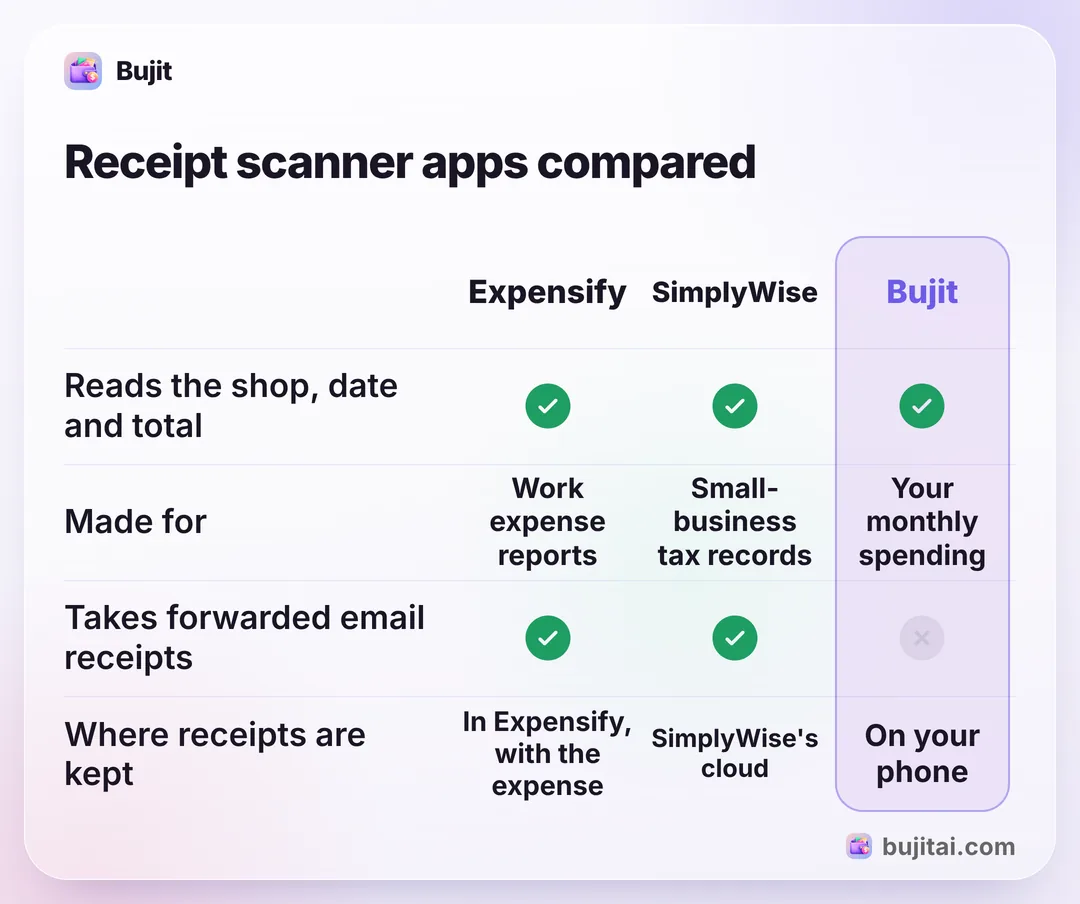
Here's how they compare, with Notes as the free option. Fetch isn't in the table: it's for points, so you'd use it next to any of these.
| Notes | Expensify | SimplyWise | Bujit | |
|---|---|---|---|---|
| Reads the shop, date and total | No, it saves a scan | |||
| Keeps a copy of the receipt | ||||
| Made for | A copy of the paper | Work expense reports | Small-business tax records | Your monthly spending |
| Checks receipts against card charges | Matches a card linked to Expensify | Reconciliation with your bank statement | ||
| Imports emailed receipts | Forwarded to its address | Forwarded in | ||
| Where receipts are kept | In your notes | In Expensify, with the expense | SimplyWise's cloud | On your phone |
How to scan receipts into Bujit
Bujit, the expense tracker we make, scans a receipt straight into your month: one photo becomes an expense with its shop, amount, date and category.
In Bujit
Get Bujit- Tap + at the top right, then Scan Receipt. If you haven't turned on Bujit's AI features yet, it asks you first, and if you need Bujit Pro, it shows you the plans.
- Tap Open Camera and take a photo of the receipt, or tap Choose Photo to use one you already have.
- Check what Bujit read. It fills in the shop, the amount, the date and a category. Change any of them before you save.
- Save it your way. A receipt with one item is saved as one expense when you tap Save. For a receipt with several items, tap Save as One for a single expense, or Save Itemized for one expense per item, using the names and categories in the Items list; each item gets its share of the receipt's total.
- See it in your month. The expense counts in Home's total and category bars right away. To see the photo later, tap the receipt icon next to the time in your list, or touch and hold the expense and tap View Receipt.
Receipt scanning is part of Bujit Pro. The photo is sent to our server and on to Google Gemini only after you agree. Gemini reads the shop, the amount, the date, the items and the category. The expense and the receipt photo are stored on your phone, with no bank login and no account. Bujit doesn't import emailed receipts or match receipts to card charges, so receipts that arrive by email are added by hand. Reading receipts is one of several things AI does in a budgeting app, along with turning what you say into an expense.
Which should you use?
- You only need a copy of the receipt: Notes on your iPhone, free.
- You scan receipts for work and file expense reports: Expensify.
- You keep receipts for a small business's taxes: SimplyWise.
- You want points for what you already buy: Fetch, next to whichever app you track with.
- You want each receipt counted in your monthly spending and budgets: Bujit.
Supermarket receipts are usually the biggest pile, and their totals are the starting point for a grocery budget you can stick to.
Questions people ask
What is the best receipt scanner app?
It depends on what the receipt is for. For work expense reports, Expensify's SmartScan reads the receipt and adds it to the right report. For a small business's tax records, SimplyWise files receipts by expense category and exports them. For reward points, Fetch turns receipts into gift cards. For your own monthly spending, Bujit turns each receipt into an expense in your budget.
Is there a free receipt scanner app?
On iPhone, the Notes app scans receipts for free: tap the Attachment button in a note, then Scan Documents. It saves a PDF of the paper but doesn't read the total or add anything up. Expensify says you can get started for free, and SimplyWise says its apps are free to download and try, with premium plans. Bujit is free to download, and receipt scanning is part of Bujit Pro.
Can a receipt scanner app read the items on a receipt?
Some read more than the total. SimplyWise says it reads the tax and the line items as well. Bujit reads the line items too, and for a receipt with several items you can save one expense per item; each item gets its share of the receipt's total.
Where do receipt scanner apps keep my receipts?
Check each app's own page. SimplyWise stores receipts in its cloud. Expensify attaches each receipt to its expense, and you can also drag receipts into its web app. Bujit keeps the expense and the receipt photo on your phone, with no account; to read the receipt, it sends the photo through our server to Google Gemini, but only after you agree.
Do I need to connect my bank to a receipt scanner app?
Not to scan receipts. Expensify matches a scanned receipt to the card charge when you paid with a card linked to Expensify, and SimplyWise has a Reconciliation feature for checking your expenses against your bank statement. Bujit has no bank connection at all.
How do I scan a receipt into Bujit?
Tap + at the top right, then Scan Receipt, and take a photo or choose one. Bujit fills in the shop, the amount, the date and a category, which you can change before you save. Receipt scanning is part of Bujit Pro. The expense counts in your month right away, and the receipt photo stays with it on your phone.
Sources
- Receipt Scanning App (Expensify) (checked Nov 15, 2026)
- How to Scan Receipts Without Manual Data Entry (SimplyWise) (checked Nov 15, 2026)
- How to Use SimplyWise (SimplyWise) (checked Nov 15, 2026)
- SimplyWise: AI Tools for Contractors (SimplyWise) (checked Nov 15, 2026)
- Fetch: earn rewards on everything (Fetch) (checked Nov 15, 2026)
- How to scan documents on your iPhone or iPad (Apple Support) (checked Nov 15, 2026)