Quick answer
A zero-based budget gives every dollar of your take-home pay a job, so income minus planned spending, saving and debt payments comes to exactly zero. It doesn't mean spending everything: savings are one of the jobs. List your income, list every expense and savings goal, adjust until it hits zero, then track and adjust each month.
- Starts from
- Take-home pay
- The goal
- Income minus every job = $0
- Savings
- A job like any other
- Works best with
- A steady income and time to track
On this page
How to make a zero-based budget
A zero-based budget gives every dollar of your take-home pay a job. Fidelity describes the aim as what you bring in and what you send out hitting zero each month, and it doesn't mean spending everything you earn: savings and extra debt payments are jobs too. These four steps follow Fidelity's and Experian's guides and need nothing but a pen and last month's statements:
- Start with your monthly take-home pay. Use what lands in your account after taxes, from your pay stubs or direct deposits, plus any side income. If your pay changes from month to month, Fidelity suggests planning from your lowest-earning months of the past year, and Experian suggests averaging the past several months.
- List every expense and savings goal. Start with what doesn't change, like rent and bills, then the basics that vary, like groceries, gas and debt payments. Add savings as a line of its own, then the wants: eating out, clothes, subscriptions. Not sure what you spend? Fidelity suggests going through your last few months of card and bank statements.
- Subtract until you reach zero. Take every line away from your income. A negative number means you've planned to spend more than you earn, so cut a nonessential. A positive number is money without a job: Fidelity suggests checking that emergency savings and retirement get enough first, then planning the rest however you like.
- Track and adjust. Write down what you actually spend during the month. If one category runs over, Experian says to cut back somewhere else so the total stays within your income. At the end of the month, compare the plan with what happened and fix next month's numbers.
If you've never added up a month before, keeping a record of a month's spending gives you the numbers for step 2.
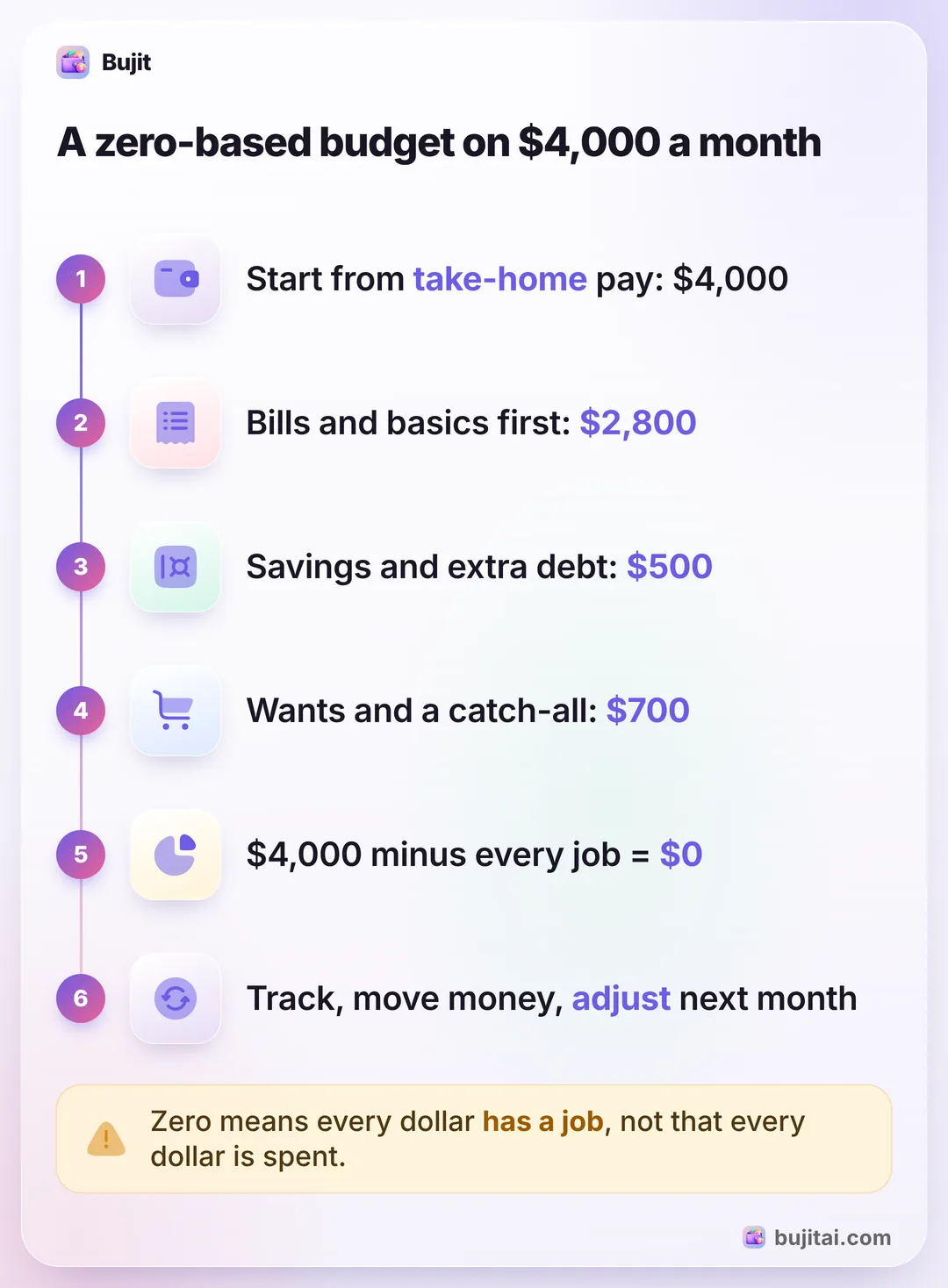
A zero-based budget on $4,000 a month
Experian's example uses $4,000 of take-home pay a month. Every dollar has a job, and the jobs add up to exactly $4,000:
| Each month | Type of job | |
|---|---|---|
| Housing (rent or mortgage) | $1,400 | Fixed bill |
| Utilities and phone | $200 | Fixed bill |
| Groceries | $400 | Basic that varies |
| Transportation (car payment, gas, insurance) | $500 | Basic that varies |
| Minimum debt payments | $300 | Basic that varies |
| Extra debt payoff | $100 | Goal |
| Emergency fund | $200 | Goal |
| Retirement savings | $200 | Goal |
| Entertainment and dining out | $250 | Want |
| Clothing and personal care | $150 | Want |
| Subscriptions | $50 | Want |
| Miscellaneous | $250 | Catch-all |
Add it up and you get $2,800 for bills and basics, $500 for savings and extra debt, and $700 for wants and the catch-all: $4,000, with nothing left over. Deciding on the $400 of savings at the start of the month, before you spend anything, is what Fidelity's Zhao calls "like paying yourself first," and an automatic transfer to savings on payday does it for you. And the $250 of Miscellaneous gives the month some room: if groceries run $75 over, Experian's answer is to take $75 from entertainment or miscellaneous so the total stays at $4,000.
When a category runs over
No month goes exactly to plan. Fidelity points out that not every expense is predictable, even when you stick to the plan. Here's what to do when the numbers don't match:
- Move money, don't add it. Take what you overspent from another category in the same month. The total stays at your income, and the budget still adds up to zero.
- Ask why it ran over. Fidelity's question: was it something you truly couldn't have seen coming, like an emergency, or something to plan for next month? If it's the second, change next month's numbers.
- Try cash for the category that keeps slipping. If overspending is the problem, Fidelity suggests putting each category's cash in its own envelope. When an envelope is empty, that category stops for the month.
- Keep a cushion for surprises. With every dollar assigned, Experian warns, a surprise bill can mean an overdrawn account or new debt. An emergency fund or a budget buffer is what absorbs it.
Zero-based budget or 50/30/20?
Both start from take-home pay. The difference is how much you decide in advance:
- The 50/30/20 rule gives you three buckets: half for needs, 30% for wants and 20% for savings and debt. Experian calls it less restrictive than zero-based budgeting and says it could be an easier place to start. Working out your 50/30/20 split takes a few minutes.
- A zero-based budget names a job for every dollar, with more categories and closer tracking. Experian says it's not necessarily beginner-friendly, and Fidelity notes it takes a lot of legwork at first, especially when income or expenses change a lot from month to month.
- You can use both. Fidelity says a zero-based budget can complement a percentage guideline, and gives one, the 60/30/10 guideline: 60% or less of take-home pay for essentials, 30% for nice-to-have extras and 10% for near-term goals and emergency savings, plus at least 15% of pretax income for retirement, including any employer match.
What a zero-based budget doesn't do
- It's a plan, not a record. It says groceries get $400. It doesn't tell you on the 20th how much of that is left.
- It needs constant upkeep. Experian says zero-based budgets often need more categories than other budgets and close watching to stick to. Fidelity adds that every purchase has to fit the plan you set at the start of the month.
- Leftovers don't plan themselves. If $30 of a category is unspent on the last day, give it a job in next month's plan, like savings, or it drifts into whatever comes next.
| Notebook | Spreadsheet | Bank app | Bujit | |
|---|---|---|---|---|
| Checks the plan adds up to zero | By hand | With a formula | Some banks | No, do it on paper |
| Shows what's left of each job | If you add it up | With formulas | Some banks | Spent of each limit, with a bar |
| Warns before a category runs out | If you set up color rules | Some banks | A banner when you add an expense in the app | |
| Includes cash | As ATM withdrawals | |||
| Needs a bank login | No | No | Yes | No |
How to run a zero-based budget in Bujit
Bujit, the expense tracker we make, tracks spending, not income, so you give every dollar its job on paper first. Savings and debt payments, minimums included, stay out of the app. The Budgets tab then holds the spending jobs, with no bank login and no account.
In Bujit
Get Bujit- See last month first. Open History, tap This Month and choose Last Month, then tap a category to see its total. Use those totals for step 2 of your plan. New to Bujit? Use last month's bank and card statements this time.
- Set the Monthly Budget to your spending jobs. Open Budgets, tap Set on the Monthly Budget card, enter the Amount and tap Save. In Experian's example, everything except the $400 of debt payments and the $400 of savings comes to $3,200.
- Give each category its job. Tap Set a budget under a category, enter the Amount and tap Save. In the example, Housing gets $1,600 with utilities and phone, Food $400, Transport $500, Entertainment $250 with dining out (log restaurant meals there, not under Food) and Shopping $150. For jobs like Subscriptions or Miscellaneous, add a category: tap the gear on Home, then Categories, then +. Then set its budget the same way.
- Choose when to hear about it. Drag Notify me at on a category's card to the percentage you want, such as 80%. A banner tells you when an expense you add in the app passes it.
- Log as you spend, and move money when one runs over. Tap + at the top right, then Manual Entry, enter the amount, what it was for and the category, and tap Save. When a card shows Over budget by an amount, tap another category's card, lower its Amount by the same amount and tap Save, then raise the one that ran over, so the month still adds up.

A category's card says Approaching limit past 80% and Over budget by the amount once you pass the limit. Budgets count the calendar month and start again on the 1st, with nothing carried over, so give any leftover a job in next month's plan. On iPhone, a Shortcuts automation can log each Apple Pay purchase when you tap your iPhone to pay. It sorts them only into Bujit's six built-in categories, so if one belongs in Miscellaneous, touch and hold it in History, tap Edit and change its category. Those taps don't show the budget banner when you pay. Voice entry and receipt scanning are part of Bujit Pro; they send what they need to Google Gemini, and only after you agree. Your expenses are stored on your phone.
Which should you use?
- You want to see if every dollar can have a job: a pen, a calculator and last month's statements, for one evening.
- You like formulas: a spreadsheet with a row for each job, your income at the top and a cell that should read $0. A Google Sheets budget built with SUMIF gives you the rows; add your income above them.
- You pay for almost everything with one card and don't use cash: your bank app's categories, checked against your plan every week.
- You use cash and cards and want each job's balance without adding it up: an expense app like Bujit, with the spending jobs set as limits.
Give the plan two full months before you judge it. The first month shows which jobs you guessed wrong; the second is usually the one that adds up.
Questions people ask
What is a zero-based budget?
A plan that gives every dollar of your take-home pay a job, whether that's rent, groceries, savings or paying off debt, so what comes in minus what goes out comes to zero. As Beau Zhao of Fidelity puts it: "There is no unplanned free cash or spending."
Does a zero-based budget mean spending everything you earn?
No. Zero means every dollar has a plan, not that it's gone. Savings and extra debt payments are jobs in the budget, and both Fidelity and Experian compare it to paying yourself first.
How do you make a zero-based budget?
Four steps: write down your monthly take-home pay, list every expense and savings goal, subtract them from your income and adjust until you get exactly zero, then track what you spend and fix next month's plan.
Can I do a zero-based budget with an irregular income?
Yes, with more planning. Fidelity suggests planning from your lowest-earning months of the past year and sending the extra in better months to savings, debt or a future month. Experian suggests averaging your income over the past several months. Experian adds that it may not be the best fit if your income is highly variable.
What do I do when I overspend in one category?
Move money from another category in the same month, so the total stays at your income. Experian's example: if groceries run $75 over, take $75 from entertainment or miscellaneous. If overspending in a category caused the gap, Fidelity suggests trying the cash envelope system.
Is a zero-based budget better than the 50/30/20 rule?
It's more detailed, not better. The 50/30/20 rule gives you three percentages; a zero-based budget names a job for every dollar. Experian calls 50/30/20 less restrictive and says it could be an easier place to start, and that a zero-based budget is not necessarily beginner-friendly.
Can I use a zero-based budget in Bujit?
Yes, with the plan made by hand. Bujit tracks spending, not income, so you give each dollar its job on paper first. Then set the Monthly Budget to your spending jobs, give each category its amount, and use Notify me at to get a banner when an expense you add in the app passes it.
Sources
- What is zero-based budgeting? (Fidelity) (checked Nov 12, 2026)
- What Is Zero-Based Budgeting? (Experian) (checked Nov 12, 2026)