Quick answer
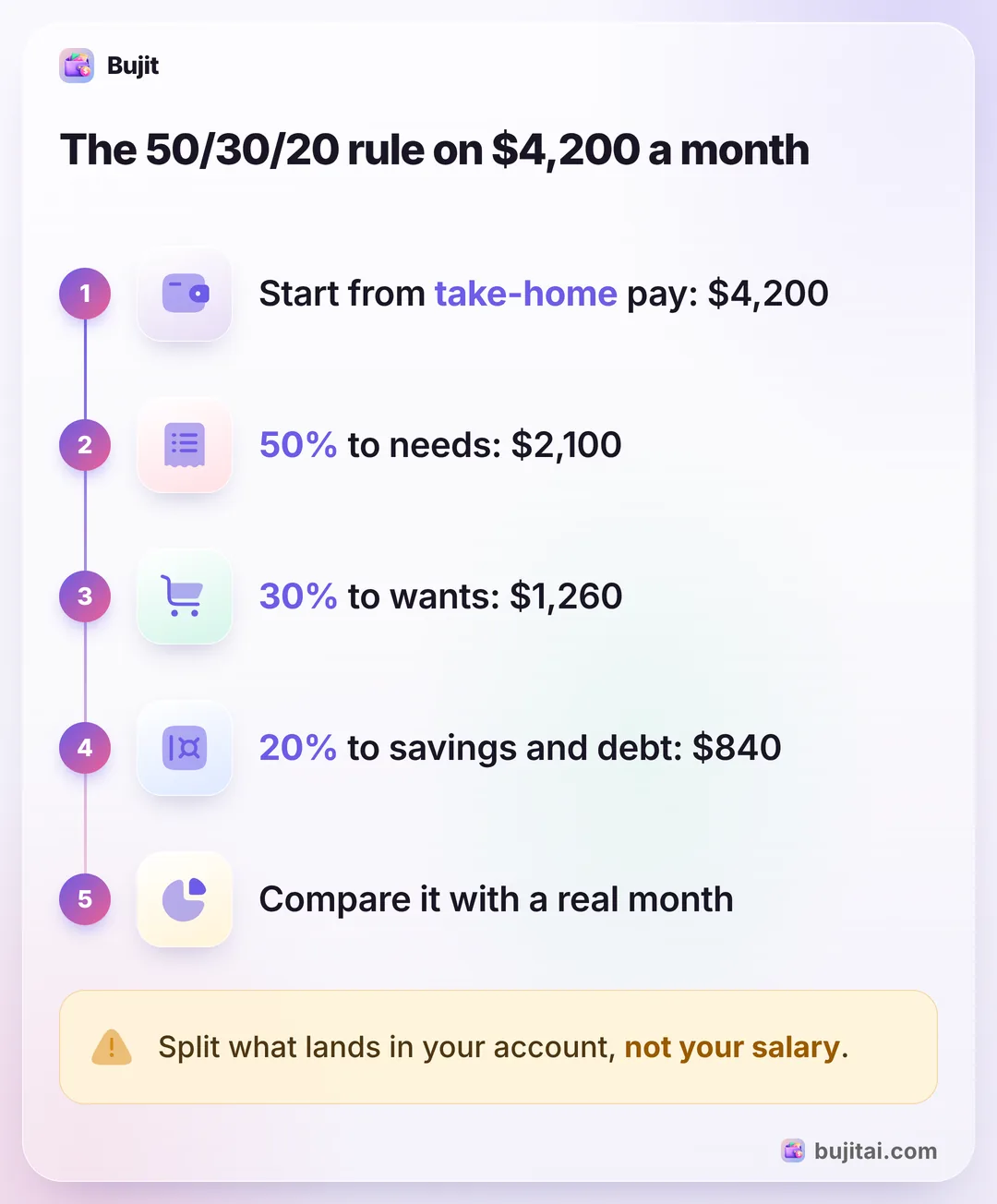
The 50/30/20 rule splits your take-home pay, not your salary: 50% for needs like rent, groceries and insurance, 30% for wants like eating out and streaming, and 20% for savings and paying down debt. On $4,200 a month that's $2,100, $1,260 and $840. Track a month of spending to see how close you are.
- Needs
- 50% of take-home pay
- Wants
- 30%
- Savings and debt
- 20%
- Split
- Take-home pay, not salary
On this page
How the 50/30/20 rule works
The 50/30/20 rule splits the money that lands in your account each month into three parts: half for needs, 30% for wants and 20% for savings and paying down debt. It was made popular by the book All Your Worth, by Elizabeth Warren and Amelia Warren Tyagi, and all it takes is a calculator.
- Start from take-home pay. Use what lands in your account after taxes, not your salary. If your paycheck also takes out health insurance or 401(k) contributions, NerdWallet suggests adding them back before you split.
- Put 50% toward needs. The bills you'd still have to pay if your income stopped: rent or mortgage, utilities, groceries, insurance, childcare and getting to work.
- Put 30% toward wants. What you could live without: eating out, streaming, concerts, shopping and trips.
- Put 20% toward savings and debt. An emergency fund, retirement savings, and payments on credit cards and student loans.
- Compare it with a real month. Add up last month's spending, sort each category into needs or wants, and divide each total by your take-home pay. Where your split and 50/30/20 differ most is where to start.
If you've never added up a month before, building a first budget from last month's numbers covers that step, and sorting spending into budget categories makes that quicker. If you'd rather plan bill by bill than in three buckets, a line-by-line budget from your pay stubs and bills works too.
The 50/30/20 rule on a real paycheck
Take a $60,000 salary. That's $5,000 a month, but it isn't what you split. For a single filer in 2026, with the $16,100 standard deduction, no state income tax and nothing else taken out, federal income tax comes to $5,020 a year, about $418 a month. Social Security and Medicare take 7.65%, about $383 a month. About $4,199 lands, so round it to $4,200.
| Share | Each month | What goes in it | |
|---|---|---|---|
| Needs | 50% | $2,100 | Rent, utilities, groceries, insurance, getting to work |
| Wants | 30% | $1,260 | Eating out, streaming, shopping, trips |
| Savings and debt | 20% | $840 | Emergency fund, retirement, credit card and student loan payments |
Your own number will differ with state tax, a 401(k) or health insurance through work. The net pay on your pay stub, with those deductions added back, is the one to split.
What counts as a need, a want or savings
Most spending sorts itself. A few things don't:
- Groceries are a need, eating out is a want, even though both are food. Keep them apart, or the food line hides the part you can cut.
- Phone and internet are wants in Forbes Advisor's example, though it notes you could argue they're needs. Pick one and stick with it, so your months compare.
- Debt payments go in the 20%. Credit card and student loan payments sit with savings. A car payment and its insurance count as needs.
- Bills that don't come every month still belong somewhere. Add up a year of them, divide by 12 and put that share in needs or wants each month.
When needs come to more than 50%
Rent alone can push needs past half. Forbes Advisor says the rule can be unrealistic on a low income or where living costs are high, and NerdWallet says it's fine to change the percentages. With $1,500 of rent out of $4,200, plus utilities, groceries and a car payment, needs can reach 60%.
That doesn't mean the rule failed. Take the extra from wants first, down to 25%, and keep saving something, even at 15%. A 60/25/15 split still puts money aside every month, and you can move back toward 20% when your rent or pay changes. If you'd rather plan every dollar instead of three buckets, a zero-based budget gives each one a job, and budgeting each paycheck helps when you're paid every two weeks.
What the 50/30/20 rule doesn't do
- It's a split, not a record. It says wants get $1,260. It doesn't say how much of that is already gone on the 18th.
- Purchases don't sort themselves. A supermarket run with groceries and a bottle of wine is part need and part want.
- It's only as good as your real numbers. A split worked out from guesses looks fine until the first month you check it. Writing down a month of real spending gives you the numbers to split.
| Notebook | Spreadsheet | Bank app | Bujit | |
|---|---|---|---|---|
| Works out the split from your pay | By hand | With a formula | Some banks | By hand, once |
| Shows what's left of each share | If you add it up | With formulas | Some banks | Spent of each limit, with a bar |
| Warns you when a category is nearly spent | If you set up color rules | Some banks | A banner when you add an expense in the app | |
| Includes cash | As ATM withdrawals | |||
| Needs a bank login | No | No | Yes | No |
How to use the 50/30/20 rule in Bujit
Bujit, the expense tracker we make, tracks spending, not income, so you work out the split once from your take-home pay. The Budgets tab then holds it, with no bank login and no account.
In Bujit
Get Bujit- See last month first. Open History, tap This Month and choose Last Month, then tap a category to see its total. Add up your needs and your wants, and divide each by your take-home pay. New to Bujit? Use last month's bank and card statements this time.
- Set the Monthly Budget to needs plus wants. Open Budgets, tap Set on the Monthly Budget card, enter the Amount and tap Save. On $4,200 of take-home pay that's $3,360, so the $840 for savings stays out of your spending.
- Give each category its share. Tap Set a budget under a category, enter the Amount and tap Save. Housing, Food, Transport and Health hold most needs; Entertainment and Shopping hold most wants.
- Choose when to hear about it. Once a category has a budget, drag Notify me at on its card to the percentage you want, such as 80%. A banner tells you when an expense you add in the app passes it.
- Log as you spend. Tap + at the top right, then Manual Entry, enter the amount, what it was for and the category, and tap Save.

Food holds groceries and eating out together. To keep the want apart, add an Eating out category: tap the gear on Home, then Categories, then +. On iPhone, a Shortcuts automation can log each Apple Pay purchase when you tap your iPhone to pay, but it only sorts into Bujit's six built-in categories, so move restaurant taps to Eating out yourself. Those taps don't show the budget banner when you pay, so open Budgets once a week too. Voice entry and receipt scanning are part of Bujit Pro; they send what they need to Google Gemini, and only after you agree. Your expenses are stored on your phone.
Which should you use?
- You want to try the rule once and see where you stand: a calculator and last month's statements.
- You like formulas and want to see the whole year: a spreadsheet with a column for needs, wants and savings.
- You pay for almost everything with one card: your bank app's categories may be enough, if you sort them into needs and wants every week.
- You use cash and cards and want each share's number without adding it up: an expense app like Bujit, with the split set as limits.
Give the split a full month of real numbers before you judge it. The second month is usually the one where the percentages fit your life.
Questions people ask
What is the 50/30/20 rule?
A simple way to split your take-home pay: about 50% for needs, 30% for wants and 20% for savings and paying off debt. It was made popular by the book All Your Worth, by Elizabeth Warren and Amelia Warren Tyagi, and it's meant as a guide to check your spending against, not a strict budget.
Is the 50/30/20 rule based on gross or net income?
Net. The rule splits your take-home pay, after taxes. If your paycheck also takes out health insurance or 401(k) contributions, NerdWallet suggests adding them back before you split, since they're a need and savings you've already paid.
What is 50/30/20 of $4,000 a month?
$2,000 for needs, $1,200 for wants and $800 for savings and debt. For any take-home amount, multiply it by 0.5, 0.3 and 0.2.
Do credit card payments count as needs or savings?
In the rule as NerdWallet and Forbes Advisor describe it, credit card and student loan payments go in the 20%, with savings, not in needs.
What if my needs are more than 50%?
Treat the rule as a check, not a law. Take the extra from wants first and keep putting something toward savings, even if it's less than 20%: a 60/25/15 split still saves every month. NerdWallet suggests a 60/30/10 budget for high cost-of-living areas or high childcare costs.
Can I use the 50/30/20 rule in Bujit?
Yes, with one step done by hand. Bujit tracks spending, not income, so work out your split once from your take-home pay. Then set the Monthly Budget to needs plus wants, give each category a limit, and use Notify me at to get a banner when an expense you add in the app passes it.
Sources
- 50/30/20 Budget Calculator (NerdWallet) (checked Nov 6, 2026)
- Your Guide To The 50/30/20 Budgeting Rule (Forbes Advisor, on Nasdaq) (checked Nov 6, 2026)
- IRS releases tax inflation adjustments for tax year 2026 (IR-2025-103) (checked Nov 6, 2026)
- Topic no. 751, Social Security and Medicare withholding rates (IRS) (checked Nov 6, 2026)