Quick answer
To create a budget, add up your monthly take-home income, list your fixed and variable expenses, and subtract. Bills you pay once a year count as one-twelfth a month. If money is left, give it to savings goals; if not, cut back. Then write down what you spend and compare it with the plan each month.
- You need
- Pay stubs, bills and last month's statements
- Steps
- Five, then a check every month
- Yearly bills
- Divide by 12, set aside monthly
- Savings goal
- 10% to 20% of income, ideally
On this page
How to create a budget, step by step
A budget is a plan you write down for how you'll spend and save your money each month. The FTC's advice is to start by gathering your bills and pay stubs. These five steps follow the FTC's guide and Oregon's Division of Financial Regulation, and they need nothing but those papers, last month's statements and a calculator:
- Estimate your monthly income. List every source and how much it brings in a month: paychecks, child support, gig work, Social Security. Use what you actually receive. If you aren't paid every month, the FTC suggests adding up last year's income and dividing by 12. If your paychecks vary in size, Oregon's guide says to estimate conservatively.
- List your fixed expenses. These are the same every month: rent or mortgage, your phone plan, insurance, the garbage bill. Write each one down with its amount.
- Estimate your variable expenses. Groceries, eating out, clothes, gas and gifts change every month, so estimate them from your last few card and bank statements. Add the bills that come once a year: divide each by 12 and include that amount.
- Compare, then decide. Subtract your expenses from your income. If there's money left, give it to your goals, like an emergency fund or retirement. If the number is below zero, you're planning to spend more than you make: cut an expense or find more income until it balances.
- Track it and adjust. At the start of the month, make the plan. Each day, write down what you spent. At the end of the month, compare what happened with the plan and change next month's numbers.
Never tracked your spending before? A month of writing down every purchase gives you real numbers for step 3 instead of guesses. If this is your very first budget, the beginner's version of these steps keeps it to about six categories.
A budget on $3,000 a month
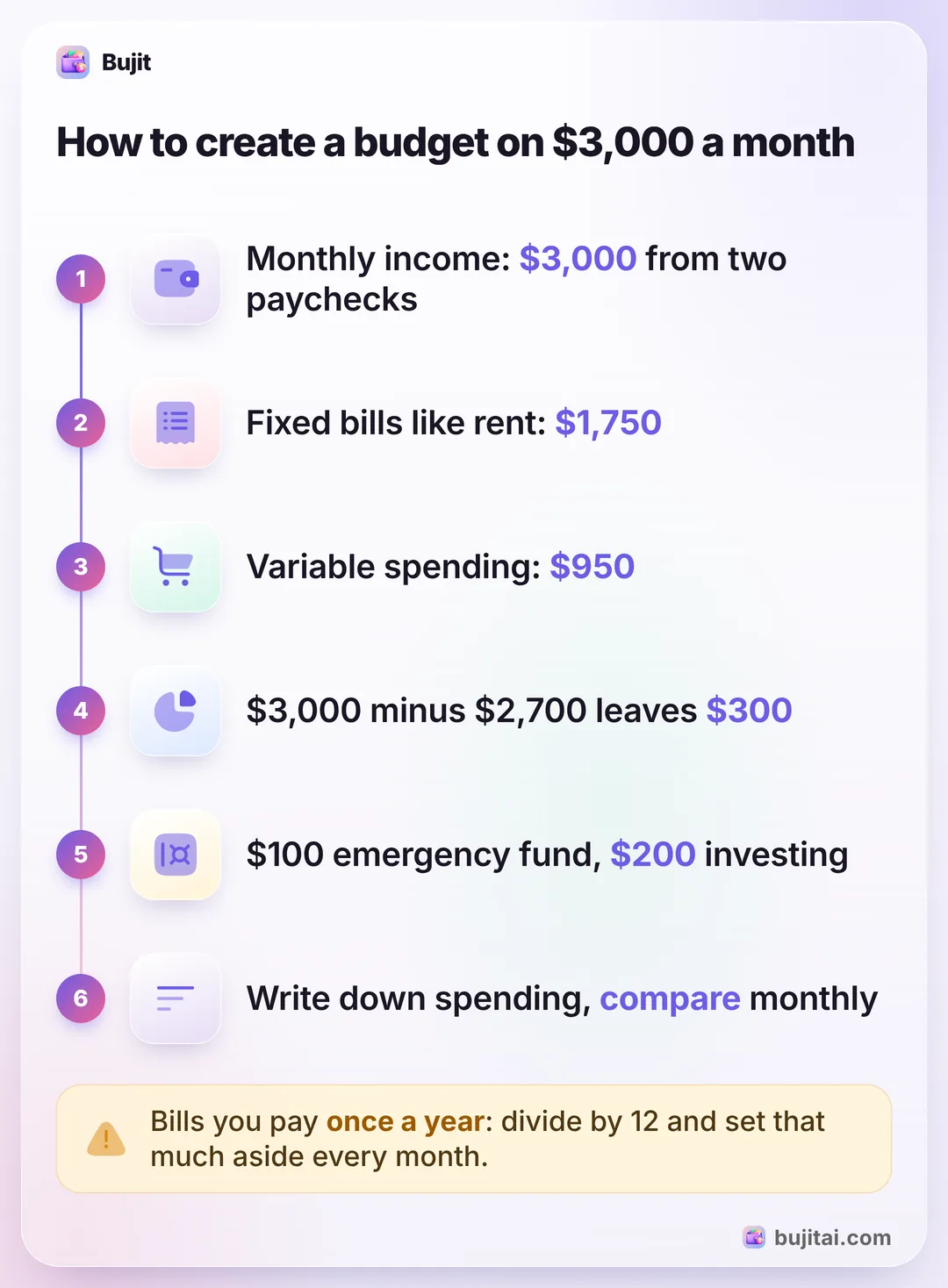
Oregon's Division of Financial Regulation works through an example: two paychecks of $1,500, so $3,000 a month to plan with.
| Each month | Type | |
|---|---|---|
| Rent | $1,400 | Fixed |
| Cell phone | $100 | Fixed |
| Garbage | $50 | Fixed |
| Car insurance | $200 | Fixed |
| Groceries | $400 | Variable |
| Eating out | $100 | Variable |
| Clothes | $100 | Variable |
| Gas | $200 | Variable |
| Gifts | $150 | Variable |
The fixed expenses come to $1,750 and the variable ones to $950, so $2,700 in all. That leaves $300 a month. In the example, $100 goes to an emergency fund and $200 to an investment account, which is 10% of income. Oregon's guide suggests working toward 10% to 20%.
Two things the example doesn't show. First, bills that don't come every month: car registration, a yearly subscription, a membership. Divide each by 12 and give it a line, so a $600 yearly bill becomes $50 a month. Second, if your numbers come out below zero, the guide's options are to spend less, for example on groceries or entertainment, or to earn more.
Choosing how to split the money
The five steps work with any method. Which one you pick changes how much you decide in advance:
- Line by line, like the example. Every bill and estimate gets its own line, and whatever is left goes to goals. It's the simplest place to start.
- The 50/30/20 rule. Half your take-home pay for needs, 30% for wants and 20% for savings and debt. Splitting your pay into needs, wants and savings takes three numbers instead of a dozen.
- A zero-based budget. Every dollar gets a job until income minus every line is exactly zero, with savings as one of the jobs. Giving every dollar a job asks for the most tracking.
- Envelopes. Each category's money goes in its own envelope, in cash or in an app. The envelope method suits a category that keeps running over.
What a budget on paper doesn't do
- It doesn't tell you where you stand mid-month. The plan says $400 for groceries. On the 18th, it can't tell you how much of that is left unless you've been writing down each purchase.
- It doesn't warn you. A category runs over without a sound, and you find out at the end of the month.
- It goes stale. Rent goes up, a subscription starts, you change jobs. Oregon's guide says budgets should be adjusted over time, and that only happens if you look at it.
| Paper worksheet | Spreadsheet | Bank app | Bujit | |
|---|---|---|---|---|
| Plans income and savings | Some banks | No, spending only | ||
| Shows what's left in each category | If you add it up | With formulas | Some banks | Spent of each limit, with a bar |
| Warns before a category runs out | If you set up color rules | Some banks | A banner when you add an expense in the app | |
| Includes cash | As ATM withdrawals | |||
| Needs a bank login | No | No | Yes | No |
How to create a budget in Bujit
Bujit, the expense tracker we make, holds the spending side of your budget: a limit for each category and a running total of what's gone. It doesn't track income, so do steps 1 and 4 on paper first. No bank login, no account.
In Bujit
Get Bujit- Check last month's spending. Open History, tap This Month and choose Last Month, then tap a category to see its total. New to Bujit? Use your bank and card statements this time.
- Set the Monthly Budget. Open Budgets, tap Set on the Monthly Budget card (or Edit total budget once it has one), enter the Amount and tap Save. In Oregon's example, that's the $2,700 of planned spending, with the $300 of savings kept out.
- Give each category its amount. Tap Set a budget under a category, enter the Amount and tap Save. In the example: Housing $1,550 (rent, phone and garbage), Food $500 (groceries and eating out), Transport $400 (gas and car insurance) and Shopping $250 (clothes and gifts). Keep the money for yearly bills out of Bujit, like savings: budgets start again each month, so a yearly bill would show as over budget in the month you pay it.
- Choose when to hear about it. Drag Notify me at on a category's card to the percentage you want, such as 80%. A banner tells you when an expense you add in the app passes it.
- Log as you spend. Tap + at the top right, then Manual Entry, enter the amount, what it was for and the category, and tap Save. At the end of the month, tap a category's card to change its Amount for next month.
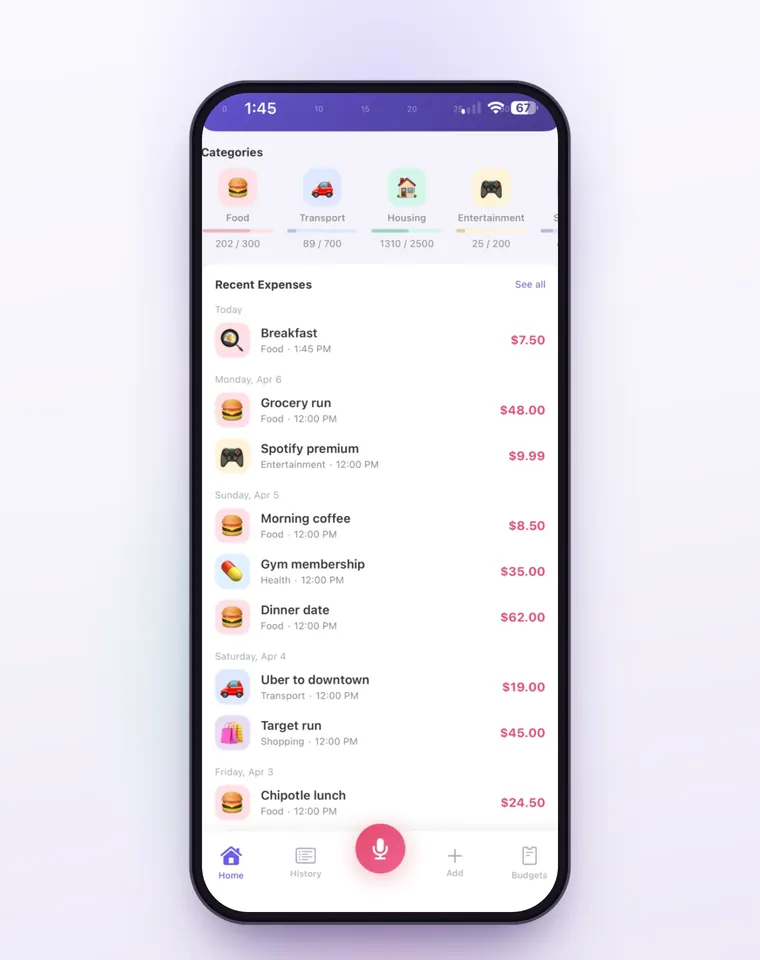
A category's card shows what's spent of its limit, says Approaching limit past 80% and Over budget by the amount once you pass it. Budgets count the calendar month and start again on the 1st, with nothing carried over. On iPhone, a Shortcuts automation can log each Apple Pay purchase when you tap your iPhone to pay; it sorts them into Bujit's six built-in categories, and those taps don't show the budget banner when you pay. Voice entry and receipt scanning are part of Bujit Pro; they send what they need to Google Gemini, and only after you agree. Your expenses are stored on your phone.
Which should you use?
- You're creating a budget for the first time: the FTC's or Oregon's steps on paper, with last month's statements, for one evening.
- You like formulas and a full view of income and savings: a spreadsheet with your income at the top and a line for each expense. A free Excel budget template from Microsoft gives you the layout.
- You pay for almost everything with one card: your bank app's categories, checked against your plan once a week.
- You use cash and cards and want to see what's left without adding it up: an expense app like Bujit, with each category's amount set as a limit.
Whatever you use, give the first budget two months. The first shows which estimates were off; the second should be closer.
Questions people ask
How do I create a budget for the first time?
Gather your pay stubs and bills, as the FTC suggests. Write down your monthly income, list every bill and expense with its amount, and subtract the expenses from the income. The answer should be more than zero. Then write down what you spend during the month and compare it with the plan at the end.
What are the steps to create a budget?
Estimate your monthly income, list your fixed expenses, estimate your variable ones, then subtract and give any surplus to goals or cut back if it's negative. Last, write down what you spend during the month and adjust next month's plan. Oregon's Division of Financial Regulation adds one more: stick with it until it becomes a habit.
How much of my income should go to savings?
Oregon's Division of Financial Regulation suggests working toward saving and investing 10% to 20% of your monthly income. In its $3,000 example, $300 a month goes to an emergency fund and an investment account, which is 10%.
How do I create a budget if my income changes every month?
If you aren't paid every month, the FTC suggests adding up all of last year's income and dividing by 12 to estimate a month. If your paychecks vary in size, Oregon's Division of Financial Regulation says to estimate on the low side, so the plan still works in a slow month.
What's the difference between fixed and variable expenses?
Fixed expenses are the same amount every month, like rent, a phone plan or a garbage bill. Variable expenses change from month to month, like groceries, eating out, clothes, gas and gifts. List the fixed ones first, then estimate the variable ones from your last few card and bank statements.
How do I budget for bills that come once a year?
Divide the yearly amount by 12 and set that much aside every month, as Oregon's Division of Financial Regulation suggests. A $600 yearly bill becomes $50 a month, so the money is there when the bill arrives.
Can I create a budget in Bujit?
Yes, for the spending side. Bujit tracks expenses, not income, so you work out income and savings on paper first. Then set the Monthly Budget to your planned spending, give each category its amount, and log what you spend so each category's card shows what's spent of its limit.
Sources
- Making a Budget (Federal Trade Commission, consumer.gov) (checked Nov 13, 2026)
- Creating a personal budget (Oregon Division of Financial Regulation) (checked Nov 13, 2026)